
Lifeline Review 2026
Lifeline, originally founded in 1974 by Dr. Andrew Dibner and widely known for decades as Philips Lifeline, is the grandfather of the personal emergency response industry. As the first company to commercialize home medical alert systems, Lifeline has protected millions of seniors over the last half-century. Today, operating within the Connect America corporate portfolio, Lifeline pairs its heritage of clinical medical alarm expertise with contemporary cellular and GPS engineering.
The brand centers its product lineup on three core platforms: HomeSafe Standard for homes with active telephone landlines, HomeSafe Wireless for cord-cutters relying on cellular networks, and the On the Go mobile communicator for active older adults who want safety coverage both indoors and out. A discreet smartwatch model is also available for individuals who prefer wrist-worn styling.
This comprehensive evaluation synthesizes verified technical specifications, independent response evaluations, and published subscription terms. We have not conducted our own hands-on lab tests. Our goal is to outline how Lifeline hardware operates in typical household routines, explain the actual recurring costs across plans, and help families decide whether Lifeline is the best fit for their loved one. We may earn referral compensation from links on this website.
1. Lifeline at a Glance
Lifeline operates on a simple, proven care model: wearable waterproof buttons wirelessly link subscribers to certified emergency response specialists on duty 24 hours a day, 365 days a year. When an emergency happens, pressing the button activates a high-priority voice channel to assess the situation and dispatch assistance.
- Core systems: HomeSafe Standard (Landline), HomeSafe Wireless (Cellular), On the Go Mobile, and Lifeline Smartwatch.
- Home coverage: Up to 800-foot button range from the base unit, supported by a 30-hour emergency backup battery.
- Mobile connectivity: Nationwide 4G LTE cellular network (AT&T) combined with GPS and Wi-Fi positioning technology.
- AutoAlert technology: Proprietary fall detection incorporating barometric sensors and accelerometers to identify downward acceleration and altitude changes.
- Caregiver app: Lifeline Cares app for iOS and Android, facilitating family coordination, location checks, and battery notifications.
- Contract terms: Month-to-month billing with no multi-year lock-in; accounts can be canceled at any time upon returning leased equipment.
Choosing the ideal Lifeline configuration comes down to the user's mobility profile. Seniors who rarely leave home and enjoy gardening or reading indoors benefit from the zero-maintenance HomeSafe base unit. Individuals who continue to drive, exercise outdoors, or travel independently should select the On the Go communicator. Reviewing the Lifeline product options clarifies which unit matches their lifestyle.
2. Lifeline Pros and Cons
Pros
- More than 50 years of medical alert experience and proven response reliability
- Patented AutoAlert fall detection uses advanced barometric pressure sensors alongside accelerometers
- HomeSafe wearable buttons never require charging, ensuring continuous protection day and night
- Up to 800-foot wireless range covers standard homes, attached garages, and yards
- On the Go mobile device integrates cellular voice, GPS, and Wi-Fi location into a compact housing
- Lifeline Cares app empowers family members to coordinate caregiving tasks and track mobile battery status
Cons
- Monthly subscription prices are higher than budget competitors across all device tiers
- AutoAlert fall detection add-on costs $10 to $15 per month, increasing annual costs
- Upfront activation or device programming fees ($50 to $99) often apply when starting service
- Smartwatch option requires daily recharging, demanding a strict charging habit
- Mobile systems depend on local AT&T wireless cellular network signal strength
- Leased hardware must be mailed back promptly upon cancellation to stop monthly billing
3. Lifeline Devices Compared
Lifeline divides its catalog between dedicated in-home units and portable on-the-go systems. In-home systems rely on an amplified tabletop console that handles all two-way voice communication, while mobile devices place the speaker, microphone, and cellular transmitter inside a wearable pendant.
Scroll horizontally to see all columns.
| System | Coverage and location | Power | Everyday fit |
|---|---|---|---|
| HomeSafe Standard | In-home console; telephone landline connection; up to 800 ft button range | AC wall outlet; 30-hour internal backup battery | Budget-conscious seniors with an active landline who spend most of their time at home |
| HomeSafe Wireless | In-home console; nationwide AT&T 4G LTE cellular; up to 800 ft button range | AC wall outlet; 30-hour internal backup battery | Home-oriented seniors who have discontinued landline telephone service |
| On the Go | Nationwide cellular; integrated GPS, Wi-Fi location, and two-way voice in pendant | Rechargeable lithium battery; 2 to 6 days per charge | Active seniors wanting a dependable emergency communicator for errands, walks, and outings |
| Lifeline Smartwatch | Nationwide cellular; built-in GPS, pedometer, and emergency SOS button | Rechargeable battery lasting 18 to 24 hours; daily charge required | Seniors seeking emergency response disguised in a modern digital wristwatch design |
These technical specifications represent published manufacturer specifications from the official Lifeline website. Real-world battery endurance and cellular signal reception vary based on cellular signal strength, environmental conditions, and frequency of use.
For the HomeSafe systems, the wearable pendant is a lightweight radio trigger that activates the base console. The wearer speaks with the response specialist through the tabletop speaker. The On the Go mobile device houses the speaker and microphone inside the pendant itself, allowing direct two-way conversation wherever the user travels.
4. Lifeline Pricing and Fees
Lifeline operates at a premium price point compared to discount medical alert brands. The higher monthly rate reflects the company's proprietary AutoAlert sensor algorithms, clinical heritage, and dedicated monitoring infrastructure.
Scroll horizontally to see all columns.
| Package | Monthly monitoring | Hardware model | Upfront activation | AutoAlert add-on |
|---|---|---|---|---|
| HomeSafe Standard | $34.95/month | Leased with subscription | $50.00 to $99.00 | +$15.00/month ($49.95 total) |
| HomeSafe Wireless | $44.95/month | Leased with subscription | $50.00 to $99.00 | +$15.00/month ($59.95 total) |
| On the Go | $49.95/month | Leased with subscription | $50.00 to $99.00 | +$15.00/month ($64.95 total) |
| Smartwatch | $49.95/month | One-time device purchase may apply | $50.00 to $99.00 | +$10.00/month ($59.95 total) |
Subscription pricing checked in October 2026 from published Lifeline documentation. Lifeline frequently adjusts one-time startup fees during seasonal promotional campaigns. While equipment is leased under standard subscription plans, subscribers are responsible for returning all components upon cancellation.
How Much Do Extras Change the Bill?
Adding optional services will increase your monthly investment. The AutoAlert fall detection upgrade adds $15.00 per month on HomeSafe and On the Go systems, which totals $180.00 over the course of a full year.
Additional accessories include a magnetic key lockbox ($29.95 one-time or included with promotional bundles), secondary household help buttons for a spouse ($10 to $15 per month), and an equipment warranty plan to guard against lost or damaged hardware. On an On the Go plan with AutoAlert, the monthly charge reaches $64.95, resulting in an annual monitoring investment of $779.40.
Monthly vs. Pre-Paid Payment Plans
Lifeline offers flexibility in billing frequency, typically supporting monthly credit card billing or annual prepayment options. Choosing an annual or semi-annual payment schedule often waives the standard $50 to $99 one-time activation and shipping fees, producing notable upfront savings.
Because Lifeline does not require multi-year contracts, subscribers who pay annually can still cancel their agreement at any time and receive a prorated refund for unused, prepaid months once all leased hardware is safely returned.
5. Lifeline Device Reviews
HomeSafe Standard: Best for Traditional Landlines
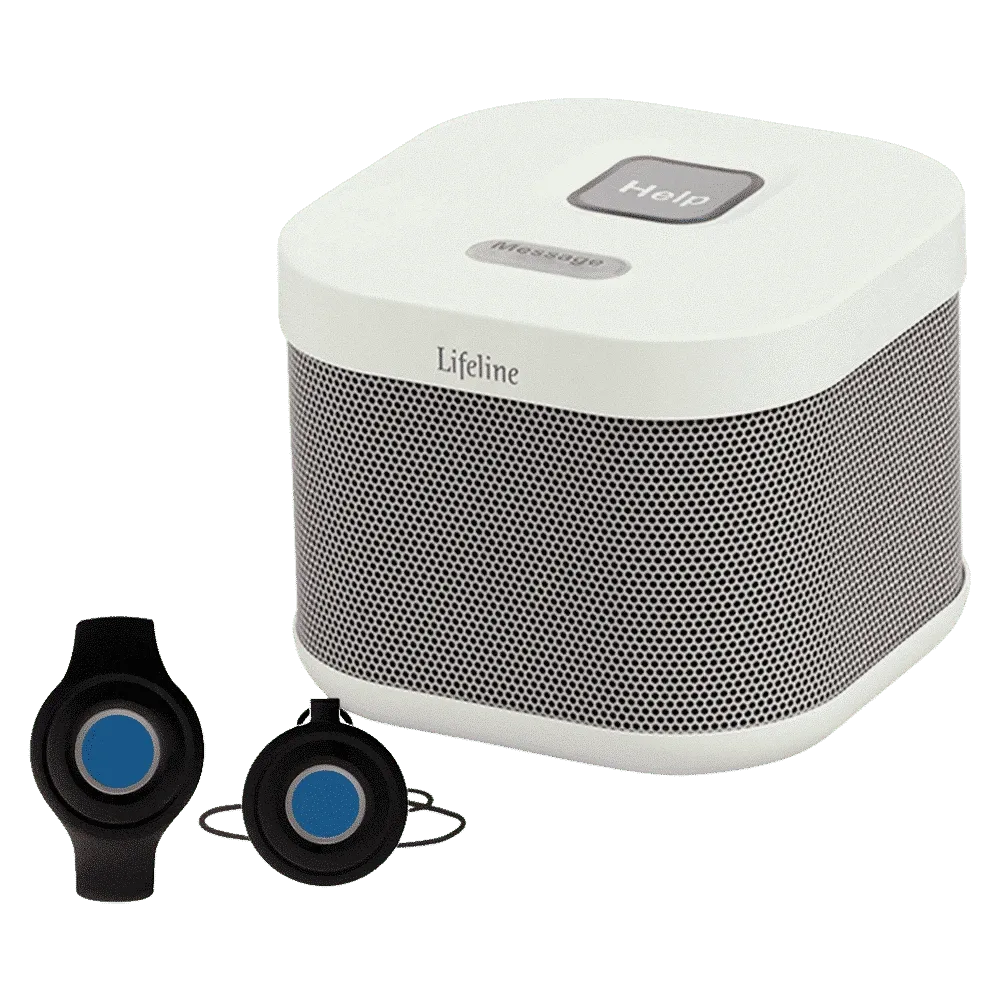
Best for: Budget-conscious individuals who maintain an active landline telephone connection and spend the vast majority of their routine at home.
Key specifications: Plugs into standard landline telephone jack and electrical outlet; high-output two-way speakerphone; 30-hour emergency battery backup; waterproof neck pendant or wrist button with up to 800-foot operating range.
The HomeSafe Standard is Lifeline's foundational medical alert system. It connects directly between your telephone wall jack and your home telephone handset. When an emergency happens, pressing the wearable button seizes the telephone line, pauses any existing phone conversation, and dials Lifeline's emergency response center.
The primary benefit of HomeSafe Standard is effortless maintenance. The included wearable button operates on a non-rechargeable internal battery engineered to last up to five years without ever needing a charging cradle. Wearers can keep the lightweight button on permanently, including while bathing and sleeping.
The trade-off is the stationary nature of voice communication. The wearable button is a radio transmitter that signals the base station; it does not contain a speaker. If a subscriber presses the button from an upstairs bedroom or backyard patio, they may not hear the operator clearly. In these situations, operators treat unanswered calls as serious emergencies and dispatch local paramedics.
HomeSafe Wireless: Cellular Reliability Without Landlines
Best for: Homebodies who do not have a traditional landline telephone and desire dependable, zero-maintenance in-home protection.
Key specifications: Built-in AT&T 4G LTE cellular transmitter; high-clarity two-way speakerphone; 30-hour emergency backup battery; waterproof help button with up to 800-foot range.
The HomeSafe Wireless console functions identically to the Standard landline unit, but replaces the telephone cord with a built-in cellular radio. It connects to nationwide AT&T towers automatically, needing only a standard electrical wall outlet for power.
This system is ideal for seniors who have transitioned to cell phones. The subscriber does not need a personal cellular subscription or mobile phone; emergency communication is fully included in the monthly Lifeline fee.
Just like the landline version, the wearable help button is 100% waterproof and maintenance-free. During electrical storms or blackout events, the internal 30-hour backup battery keeps the console active, ensuring constant security until utility power is restored.
On the Go: Complete Mobile Independence
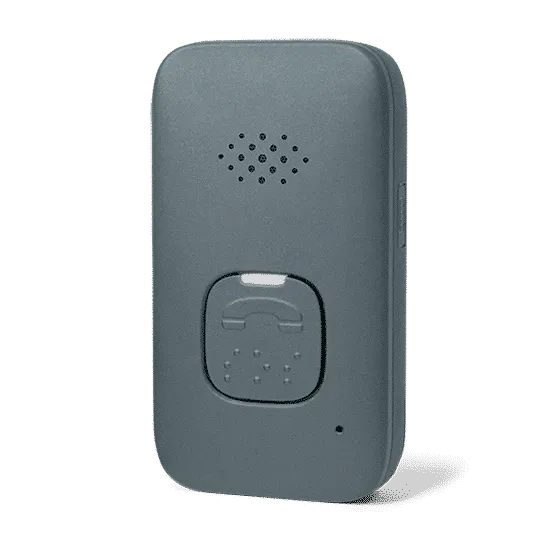
Best for: Active older adults who drive, shop, garden, or travel independently and want two-way emergency access wherever they go.
Key specifications: Nationwide AT&T 4G LTE cellular connectivity; integrated GPS and Wi-Fi location technologies; built-in speaker and microphone; rechargeable battery lasting 2 to 6 days; optional AutoAlert fall detection.
The On the Go communicator is a compact, self-contained medical alert system that combines a two-way cellular speakerphone and satellite GPS inside a single lightweight pendant. It can be worn comfortably around the neck on an adjustable lanyard.
Because the speaker and microphone are built directly into the pendant, the user can speak with a response specialist from anywhere with cellular reception, whether in a grocery store parking lot, on a walking trail, or in a neighbor's kitchen. Operators use GPS and Wi-Fi tower signals to locate the wearer quickly if they cannot speak or do not know their location.
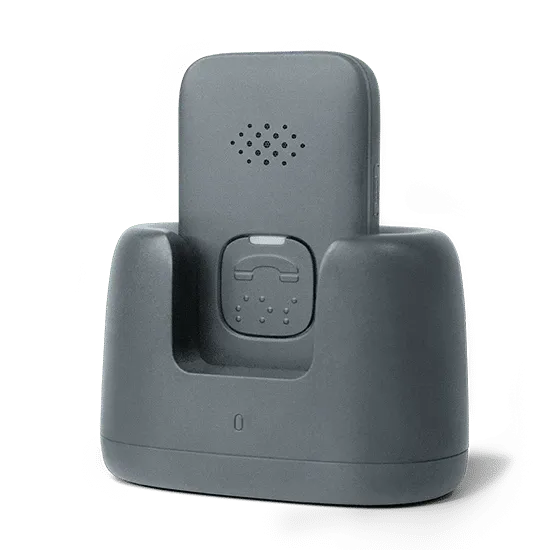
The On the Go device delivers dependable battery longevity, running between 2 and 6 days on a single charge depending on cellular signal quality and movement. An included magnetic charging cradle makes daily or weekly recharging straightforward.
Lifeline Smartwatch: Modern Wrist Styling
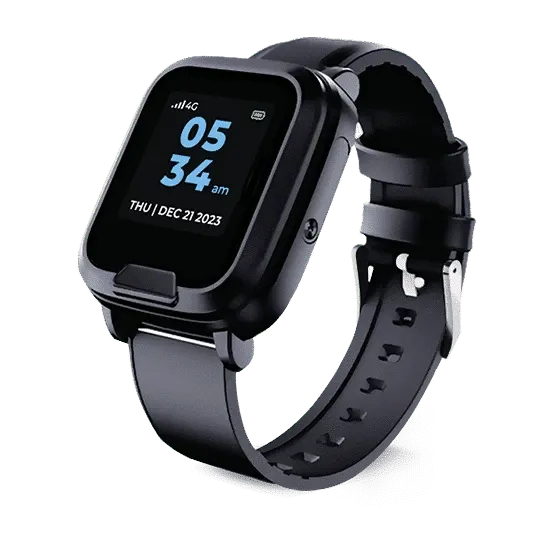
Best for: Seniors who dislike traditional medical alert pendants and prefer a contemporary, discreet wrist-worn device.
Key specifications: Dedicated cellular connectivity; integrated GPS tracking; full-color touchscreen; physical red SOS help button; built-in step counter and heart rate monitor.
The Lifeline Smartwatch integrates personal safety into a modern digital watch format. It displays the time, date, step count, and battery level on a bright, crisp screen, blending seamlessly with everyday attire.
When assistance is needed, the wearer presses the physical red emergency button on the side of the watch case or taps the touchscreen help icon. The built-in microphone and wrist speaker enable direct, hands-free conversation with Lifeline operators.
The primary consideration with the smartwatch format is battery life. Like most smartwatches, it requires daily charging, typically lasting 18 to 24 hours per charge. Wearers must establish a consistent routine of charging the device while sitting at a desk or getting ready in the morning.
6. How Does Lifeline Work?
Activating Lifeline during an emergency is simple and rapid:
- Button Press: The user presses the help button on their neck pendant, wristband, smartwatch, or tabletop console. If AutoAlert is enabled and a sudden fall occurs, the sensor initiates the call automatically.
- Encrypted Signal Transmission: The unit transmits a digital distress signal through telephone lines or cellular networks to Lifeline's central monitoring network.
- Live Specialist Connection: A certified emergency response specialist answers the call through the two-way speakerphone, typically within 25 to 35 seconds.
- Assessment and Medical Profile Review: The specialist checks the caller's pre-recorded medical history, confirms their condition, and asks what help is required.
- Dispatch and Family Contact: The specialist contacts local emergency medical services (EMS) or coordinates with family members from the user's customized contact list. If EMS is sent, operators provide first responders with the home lockbox code for quick entry.
If a subscriber presses the help button but cannot speak, or if AutoAlert triggers an alarm with no response, operators immediately treat the call as a high-priority emergency and dispatch local paramedics to the home address or GPS coordinates.
7. Performance and Reliability
Response Speed and Call Handling
Lifeline maintains dedicated emergency monitoring centers in North America with redundant backup facilities. Independent testing data shows Lifeline operators respond to incoming distress calls in an average of 25 to 35 seconds.
Lifeline's operators undergo intensive training in geriatric care, emergency triage, and de-escalation techniques. When communicating with disoriented or injured seniors, operators maintain a calm, reassuring demeanor until emergency personnel arrive on scene.
Cellular, GPS, and Wi-Fi Positioning
Lifeline's wireless and mobile systems utilize AT&T's 4G LTE cellular network. The On the Go mobile communicator pairs cellular triangulation with GPS satellite data and nearby Wi-Fi beacon signals to calculate accurate physical location coordinates.
Audio performance is strong across the hardware lineup. The HomeSafe base console features an amplified speaker engineered to penetrate across multiple rooms, while the On the Go pendant utilizes background noise-suppression microphones to ensure the operator can understand the wearer outdoors in windy or noisy environments.
AutoAlert Fall Detection Accuracy
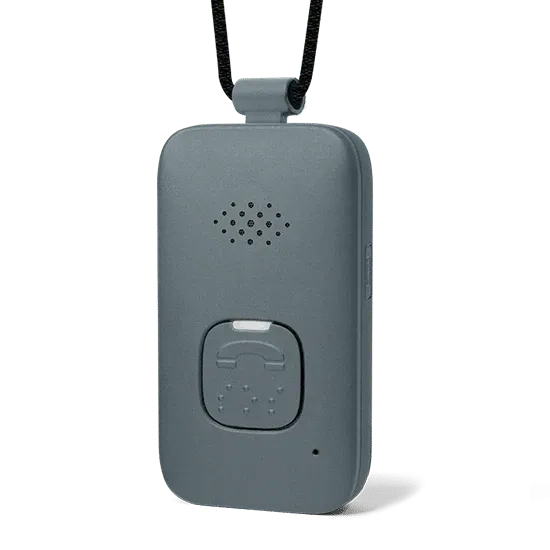
Lifeline's patented AutoAlert technology is widely recognized as one of the most sophisticated fall detection systems available. Unlike basic accelerometers that simply monitor sudden motion, AutoAlert integrates multi-axis accelerometers with barometric pressure sensors to measure precise changes in altitude.
The system evaluates three distinct factors: the velocity of downward movement, the force of impact, and whether the wearer remains in a horizontal, immobile state following the impact. This multi-sensor approach reduces false alarms caused by dropping a pendant on a table or sitting down quickly.
However, consumers must understand that no automated fall detection technology is 100% accurate. Gentle slides out of bed, slumping against a wall, or falls onto deep plush carpet may not produce the acceleration needed to trigger an automatic alert. Wearers must always press the physical emergency button manually whenever they are able.
8. Features and Add-ons
Lifeline provides several practical add-ons to enhance household emergency response:
- Key Lockbox: A heavy-duty combination lockbox that secures a spare house key outside your front door, allowing paramedics to enter without breaking doors or windows during an emergency.
- AutoAlert Fall Detection: The proprietary sensor upgrade available across HomeSafe and On the Go systems for $10 to $15 per month.
- Additional Help Buttons: Waterproof wearable buttons allowing a spouse or housemate to be monitored on the same HomeSafe base unit for a modest monthly fee.
- Protection Plan: An optional hardware warranty that covers the replacement cost of leased equipment if it is accidentally lost, damaged, or dropped.
9. Setup and Ease of Use
Lifeline equipment arrives pre-activated and programmed to your account, making do-it-yourself installation fast and straightforward.
Setting up the HomeSafe Wireless console requires four simple steps:
- Place the base unit in a central area of the house, away from large metal appliances or thick masonry walls.
- Plug the power cord into an unswitched electrical wall outlet.
- Turn on the master power switch on the bottom or rear of the console and wait for the voice prompt confirming cellular connection.
- Press the wearable help button to initiate a live test call and speak with a response specialist.
Setting up the On the Go mobile communicator is just as simple: plug the charging cradle into a wall outlet, place the pendant into the cradle until the green battery indicator illuminates, and step outside to place an initial test call. Lifeline recommends testing the system once a month to verify connectivity.
10. Lifeline Cares App and Caregiver Features
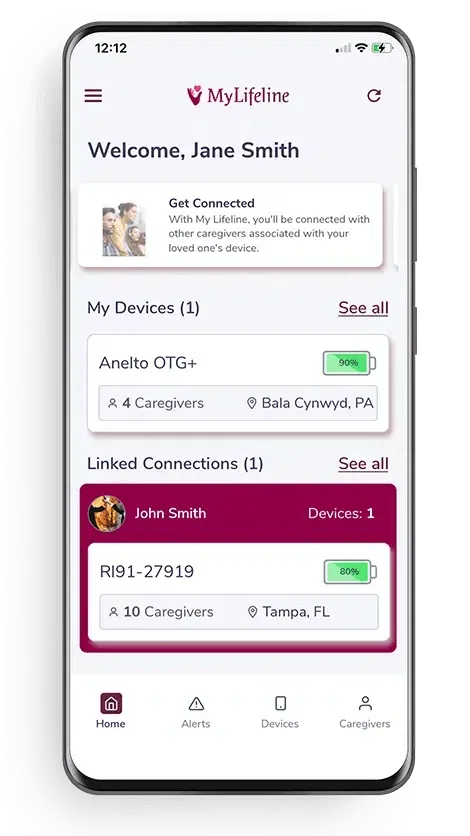
Lifeline supports family caregivers through the Lifeline Cares app (available for iOS and Android smartphones). The app creates a private communication network called a "Care Circle" to keep family members, neighbors, and professional aides updated.
Key capabilities of the Lifeline Cares app include:
- Location Tracking: View the current geographic location of the On the Go mobile communicator on a live digital map.
- Device Status and Battery Level: Check whether the mobile unit is powered on, connected to cellular service, and see the remaining battery percentage.
- Care Circle Management: Add or modify emergency contacts, assign specific roles, and see who is on call to assist.
- Activity and Alert History: Review recent emergency activations and system tests.
- Notes and Reminders: Leave digital notes for other family members regarding doctor appointments, medication changes, or recent home visits.
The Lifeline Cares app is an intuitive, well-designed tool that provides peace of mind to adult children managing the care of an aging parent from a distance.
11. Customer Service, Warranty, and Cancellation
Monitoring Center Quality
Lifeline operates multiple TMA Five Diamond-certified monitoring centers staffed 24 hours a day, 365 days a year. All centers feature redundant power generators and backup data centers. In the event of severe weather or regional network disruptions, calls instantly roll over to sister facilities without interruption.
Administrative and technical support is available by phone during extended business hours. Customer support representatives can connect with professional translation services supporting more than 140 languages for non-English-speaking callers.
Warranty and Hardware Replacement
Because Lifeline equipment is leased under standard subscription plans, the company covers hardware malfunctions resulting from normal wear and tear or manufacturer defects at no extra charge. If a base station or communicator stops working, Lifeline ships a replacement unit promptly.
Subscribers who want protection against accidental damage, liquid spills, or misplaced devices can enroll in Lifeline's optional Protection Plan for an additional monthly fee.
Cancellation Terms and Process
Lifeline provides flexible cancellation terms without long-term contracts:
- No Long-Term Contracts: Services operate on a month-to-month agreement with no multi-year termination penalties.
- Cancellation Notice: Subscribers can cancel service by contacting customer service by phone.
- Equipment Return Requirement: Because equipment is leased, billing continues until all components (base unit, wearable buttons, power adapters, and charging cradles) are returned to Lifeline's warehouse.
- Return Tracking: Always request a tracking number when shipping hardware back and keep the postal receipt until written cancellation confirmation is received.
12. Lifeline vs. Competitors
Comparing Lifeline with other leading emergency response brands illustrates where its heritage and technology stand out:
Scroll horizontally to see all columns.
| Provider | Reason to compare | Decision to check |
|---|---|---|
| Lifeline | 50+ years of clinical heritage, patented AutoAlert barometric fall detection, and Lifeline Cares app | Monthly subscription costs and upfront startup fees are higher than budget brands |
| Bay Alarm Medical | Lower monthly monitoring fees ($27.95/mo) and modern SOS Micro and Smartwatch options | Mobile hardware requires an upfront equipment purchase ($149-$199) |
| Medical Guardian | Stylish Guardian Flex and MGMove devices with comprehensive MyGuardian caregiver app | Higher upfront equipment costs and additional caregiver subscription tiers |
| LifeFone | 16-day VIPx battery life, free spouse monitoring, and $5 fall detection upgrade | Base station button range is slightly shorter on landline models |
| Medical Alert | Affordable leased hardware packages with 5-day mobile battery life and no equipment purchases | Basic caregiver app with fewer task management and note-sharing tools |
Lifeline's primary advantage over rivals is its proprietary AutoAlert technology, which integrates barometric pressure sensing for more accurate fall detection, along with its extensive half-century operational track record. However, competitors like Bay Alarm Medical and LifeFone offer lower monthly monitoring rates and cheaper fall detection add-ons ($5 to $10/month vs. Lifeline's $15/month).
13. Who Should Buy Lifeline?
Best for:
- Seniors seeking proven, clinical-grade reliability: Individuals who value Lifeline's 50-year reputation and hospital-grade monitoring standards.
- Individuals at high risk for falls: Wearers who need the superior accuracy of AutoAlert's dual-sensor barometric and accelerometer technology.
- Family caregivers managing care collectively: Families who will actively use the Lifeline Cares app to organize care circles, monitor mobile battery levels, and share notes.
- Homebodies who want zero-maintenance equipment: The HomeSafe button's multi-year battery life eliminates the chore of daily charging.
Not ideal for:
- Shoppers on a strict monthly budget who want sub-$30 monitoring plans.
- Consumers looking to avoid one-time activation and equipment processing fees.
- Individuals residing in areas with poor AT&T wireless cellular coverage.
14. Final Verdict: Is Lifeline Worth It?
Lifeline remains one of the most respected and dependable names in the medical alert industry. Decades of refined emergency response experience, certified monitoring centers, and the clinical sophistication of patented AutoAlert fall detection set a high benchmark for personal safety.
While Lifeline's monthly subscription rates and startup fees are higher than discount competitors, the added cost delivers tangible value: clinically tested fall algorithms, reliable 800-foot home range, 30-hour base backup battery, and a versatile Lifeline Cares app that keeps family members synchronized.
For older adults and families willing to invest in premium emergency protection backed by five decades of experience, Lifeline is an exceptionally capable and reassuring choice.
VIEW LIFELINE PLANS