
LifeFone Review 2026
LifeFone has been providing personal emergency response systems for decades, earning a reputation for dependable hardware, consumer-friendly policies, and flexible protection options. Rather than locking subscribers into rigid multi-year commitments or demanding heavy upfront hardware fees, LifeFone focuses on straightforward monitoring designed for older adults who want peace of mind without technological confusion.
Its current product lineup spans traditional in-home base stations, ultra-compact mobile communicators, and a modern medical alert smartwatch. Notable highlights include a lifetime price-lock guarantee, free monitoring for a spouse on home packages, and the VIPx mobile unit, which provides up to 16 days of battery life on a single charge.
This review combines current manufacturer product information with independent testing data and verified consumer terms. We have not conducted our own hands-on testing. Our evaluation examines how LifeFone systems perform in daily use, what they cost across monthly and annual plans, and which households they suit best. We may receive referral compensation through links on our site.
1. LifeFone at a Glance
LifeFone connects individuals directly to professional emergency response specialists through a dedicated help button and subscriber profile. When an alert is triggered, monitoring operators can immediately communicate through the device, review the user's custom medical instructions, and contact designated family members, neighbors, or local first responders.
- Core systems: At-Home Landline, At-Home Cellular, VIPx, VIP Active, and Safe Watch Active.
- Home range: Up to 1,300 feet of coverage from the base unit, among the longest distances in the industry.
- Spouse protection: Free monitoring for a second person living in the same home on basic At-Home plans.
- Battery standout: The VIPx mobile communicator offers up to 16 days between charges.
- Fall detection: Available across compatible systems for $5 per month, half the standard competitor rate.
- Contract terms: No long-term contracts, lifetime price lock, and prorated refunds on prepaid service.
Before selecting a model, evaluate where the wearer spends the majority of their time. A senior who rarely leaves the house may find the At-Home Cellular system ideal, while someone who gardens, walks, or runs errands will benefit from the compact GPS tracking of the VIPx or VIP Active. Exploring the current LifeFone catalog helps match the device format to the user's actual habits.
2. LifeFone Pros and Cons
Pros
- No upfront equipment purchase fees required on core monitoring packages
- Free monitoring coverage for a spouse on At-Home base systems
- VIPx offers up to 16 days of battery life, reducing daily recharge worries
- Automatic fall detection add-on costs only $5 per month
- Lifetime price-lock guarantee ensures monthly rates never increase
- Generous 30-day trial and prorated refunds on unused prepaid service
Cons
- Securing the lowest advertised monthly rate requires paying annually upfront
- Smartwatch requires daily charging to maintain continuous nighttime protection
- Caregiver tracking app requires a separate $8 monthly subscription
- Cellular models depend on local AT&T or Verizon wireless network signal strength
- Automatic fall detection cannot guarantee 100% detection of all fall types
- Equipment must be returned in good working condition upon account cancellation
3. LifeFone Devices Compared
The core distinction within LifeFone's lineup is whether assistance is anchored to the household base station or travels anywhere nationwide using cellular connectivity. The At-Home systems provide exceptional coverage throughout the house and yard, while the mobile pendants and smartwatch house their own speaker, microphone, cellular modem, and GPS positioning hardware.
Scroll horizontally to see all columns.
| System | Coverage and location | Power | Everyday fit |
|---|---|---|---|
| At-Home Landline | In-home base; traditional telephone jack; up to 1,300 ft button range | Wall outlet; up to 32-hour internal backup battery | Seniors with an active landline who spend most time at home |
| At-Home Cellular | In-home base; AT&T 4G LTE cellular; up to 1,300 ft button range | Wall outlet; up to 32-hour internal backup battery | Households without a landline wanting simple, zero-maintenance home coverage |
| VIPx | Nationwide AT&T or Verizon cellular; GPS, Wi-Fi, and cellular location | Rechargeable battery lasting up to 16 days per charge | Active seniors wanting an ultra-lightweight pendant with industry-leading battery life |
| VIP Active | Nationwide 4G LTE cellular; GPS and text-to-locate tracking | Rechargeable battery lasting up to 5 days per charge | Users seeking a compact, durable on-the-go button with lanyard and clip options |
| Safe Watch Active | Nationwide 4G LTE cellular; GPS, pedometer, and heart rate monitor | Rechargeable battery lasting up to 24 hours; daily charge | Wearers who want an emergency SOS button integrated into a modern touchscreen watch |
These specifications represent published manufacturer data from the At-Home Landline, At-Home Cellular, VIPx, and Safe Watch Active product listings. Real-world battery life and signal strength depend on local cellular reception, temperature, and alert frequency.
Voice communication on At-Home systems occurs through the powerful speaker and sensitive microphone located in the base console. While the lightweight wearable help button can trigger an alarm from up to 1,300 feet away, speaking to an operator from another room or outdoors requires relying on the base unit's volume or emergency contact protocols. In contrast, portable mobile devices include an integrated two-way speakerphone directly inside the pendant.
4. LifeFone Pricing and Fees
LifeFone is one of the few medical alert companies that does not charge upfront hardware purchase fees or mandatory activation charges on its standard systems. You lease the equipment as part of the ongoing monitoring agreement. Monthly rates depend on the chosen billing interval: paying monthly offers maximum flexibility, while paying quarterly or annually delivers significant savings.
Scroll horizontally to see all columns.
| Package | Monthly monitoring | Standard equipment | First year at monthly billing | Detection |
|---|---|---|---|---|
| At-Home Landline | $29.95 ($24.95 on annual) | Included with service; no hardware fee | $359.40 ($299.40 on annual) | +$5.00/month optional fall detection |
| At-Home Cellular | $34.95 ($30.95 on annual) | Included with service; no hardware fee | $419.40 ($371.40 on annual) | +$5.00/month optional fall detection |
| VIPx | $45.95 ($43.95 on annual) | Included with service; no hardware fee | $551.40 ($527.40 on annual) | +$5.00/month optional fall detection |
| VIP Active | $41.95 ($37.95 on annual) | Included with service; no hardware fee | $503.40 ($455.40 on annual) | +$5.00/month optional fall detection |
| Safe Watch Active | $47.95 ($43.95 on annual) | Included with service; no hardware fee | $575.40 ($527.40 on annual) | +$5.00/month optional fall detection |
Pricing figures reflect published plan rates checked in October 2026. Annual billing examples calculate twelve months at the discounted rate and include free shipping, a complimentary lockbox, and free spouse monitoring where applicable. Because equipment is provided as a lease, hardware must be returned upon account closure.
How Much Do Extras Change the Bill?
Adding optional services will adjust your ongoing billing. LifeFone's automatic fall detection add-on is priced at $5 per month, adding $60 across a full year. This is notably more affordable than competitor detection add-ons that commonly run $10 per month ($120 annually).
The optional LifeFone Family Guard caregiver mobile app costs $8 per month ($96 per year), providing real-time location tracking, geofence alerts, and activity notifications. An optional Protection Plan is available for $5 per month, covering hardware replacement in the event of accidental damage, loss, or equipment theft. Adding fall detection and caregiver tracking to a VIPx monthly plan brings the total to $58.95 per month.
Choosing a Payment Schedule
LifeFone provides monthly, quarterly, and annual billing terms. Monthly billing avoids large upfront commitments and makes ongoing budgeting simple. However, annual billing lowers the effective monthly fee by $2 to $5 per month while bundling perks like free ground shipping, a free lockbox, and free activation.
Importantly, LifeFone is one of the few providers that offers a true prorated refund policy on prepaid service. If you prepay for an annual subscription and decide to cancel after four months, LifeFone will refund the remaining unused months once equipment is returned. This eliminates the financial risk often associated with prepaying for medical alert services.
5. LifeFone Device Reviews
At-Home Landline & Cellular: Best for a Household Routine
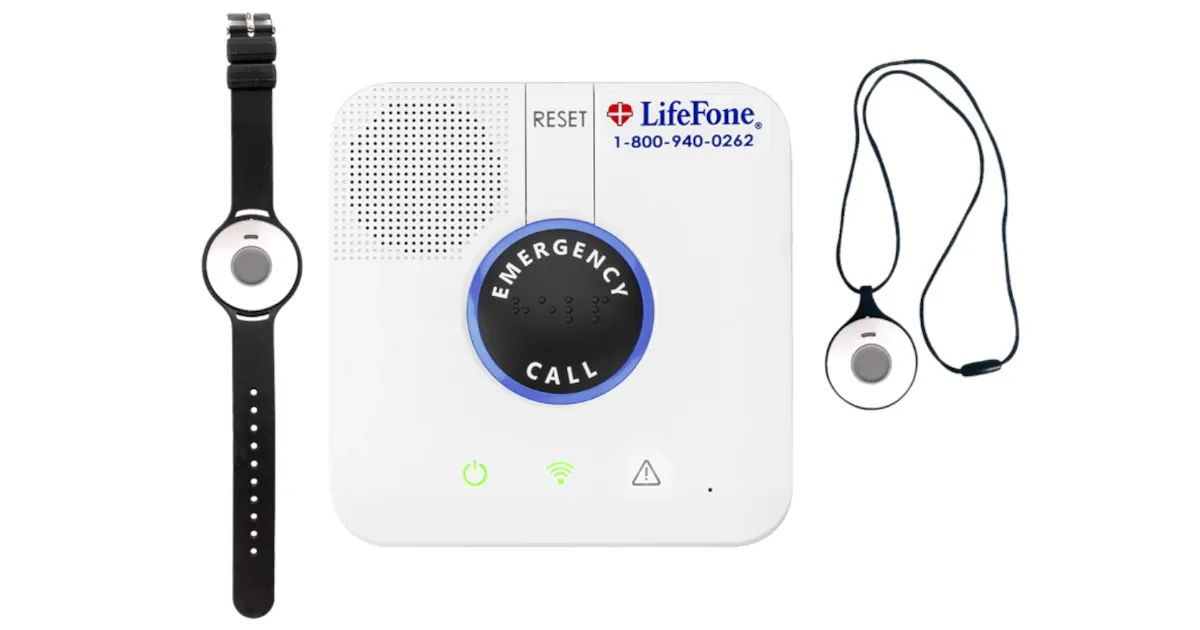
Best for: Individuals or couples who spend the vast majority of their time at home and want an uncomplicated help button that never needs recharging.
Key specifications: Landline telephone cord or integrated AT&T 4G LTE cellular connection, base station with loud two-way speakerphone, internal 32-hour backup battery, and a waterproof neck pendant or wrist button with up to 1,300 feet of wireless range.
The primary benefit of the At-Home system is convenience. The wearable help button is ultra-lightweight, waterproof for shower use, and powered by an internal battery that lasts over three years without requiring a charging cradle. Users can wear it continuously, even while sleeping or bathing, eliminating the risk of forgetting to put it back on after charging.
A major selling point for couples is LifeFone's free spouse monitoring. LifeFone will monitor a second person living in the same home at no additional monthly subscription cost; you only pay a nominal one-time fee for the second wearable button. For two seniors sharing a home, this cuts monitoring costs in half compared to providers that charge two full monthly memberships.
The main limitation is geographic range: once the wearer travels beyond the 1,300-foot perimeter of the base station, the home button cannot communicate with the monitoring center. For active seniors who drive, walk, or travel, a mobile system is required.
VIPx: Best for Extended Battery Life Away From Home
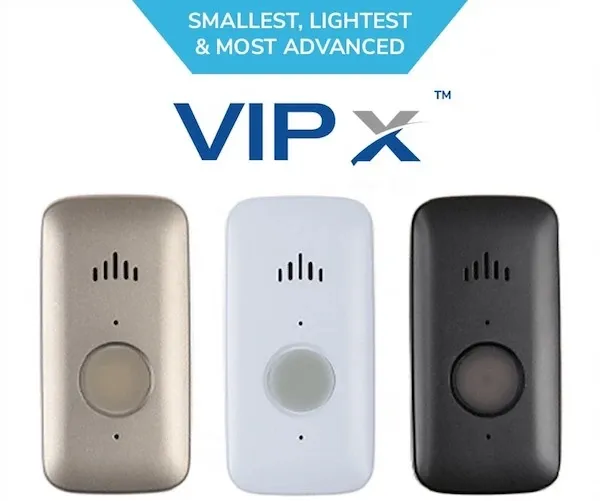
Best for: Active seniors who want reliable on-the-go protection without the burden of plugging in a device every night.
Key specifications: Dual nationwide cellular support (AT&T or Verizon 4G LTE), combined GPS, Wi-Fi, and cellular location tracking, two-way HD voice audio, up to 16 days of standby battery life, and an optional $5 monthly fall detection upgrade.
Weighing just 1.3 ounces, the VIPx is one of the smallest and lightest mobile medical alert communicators on the market. It can be worn comfortably as a necklace pendant or clipped securely to a belt or purse. Despite its compact footprint, it houses a full cellular radio and speakerphone, enabling the user to speak directly with an emergency operator anywhere cellular coverage is available.
The defining advantage of the VIPx is its battery longevity. While most competing mobile pendants require recharging every 48 to 72 hours, the VIPx operates for up to 16 days on a single charge under standard use (or 10 days with frequent location pings). This drastically reduces the likelihood of the device sitting dead in a charging cradle when an emergency occurs.
The VIPx also pairs seamlessly with the optional LifeFone Family Guard caregiver application, allowing adult children to check device location, review battery percentages, and receive geofence entry and exit alerts.
VIP Active: Best for Lightweight Mobile Protection
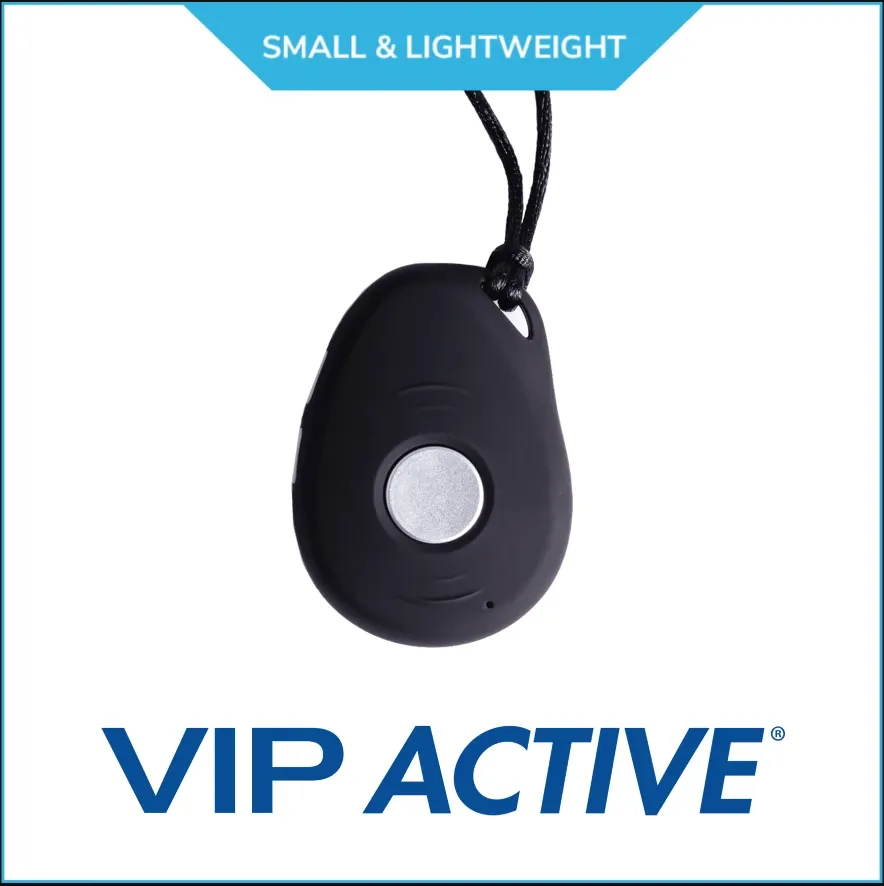
Best for: Individuals seeking a dedicated, durable mobile alert device with convenient text-to-locate features and a lower monthly price point.
Key specifications: 4G LTE cellular network, GPS location assistance, two-way voice communication, up to 5 days of battery life, text-to-locate functionality, and a lightweight water-resistant casing.
The VIP Active bridges the gap between basic home systems and high-end tracking devices. It offers complete independence outside the home with an integrated speaker and microphone, so wearers do not need to carry a separate mobile phone. The device is durable, discreet, and comfortable enough for daily wear.
A standout capability of the VIP Active is its text-to-locate feature. Authorized family members can simply send a text message to the device's assigned telephone number to receive an instant reply containing the wearer's current geographic location on a map. This offers a convenient, low-cost way for caregivers to confirm their loved one's whereabouts without paying for a full app subscription.
With up to five days of battery life, the VIP Active easily accommodates short trips and weekend visits between charges, though it requires more frequent recharging than the flagship VIPx.
Safe Watch Active: Best for Someone Who Likes a Watch
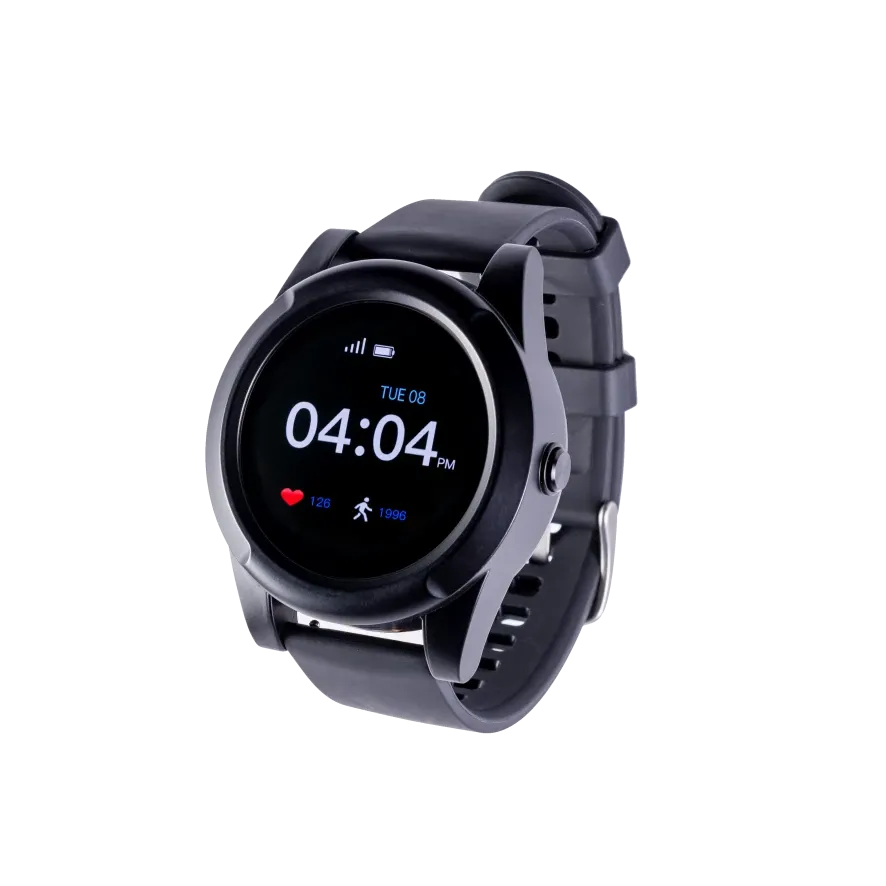
Best for: Seniors who prefer the contemporary appearance of a modern smartwatch rather than wearing a traditional medical alert pendant.
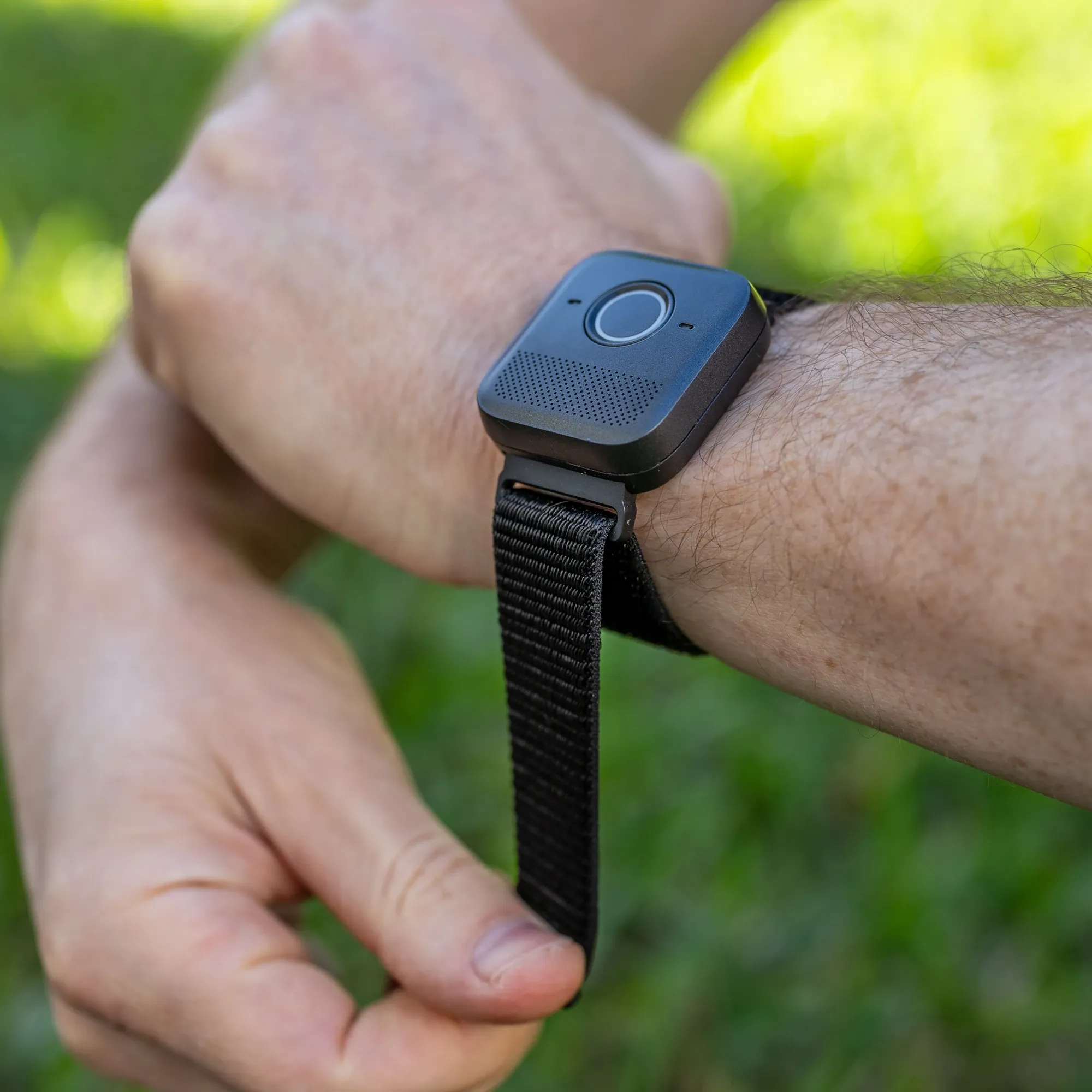
Key specifications: Dedicated 4G LTE cellular connectivity, built-in GPS location, color touchscreen display, physical red emergency SOS button, step counter, heart rate monitor, and magnetic charging cable.
The Safe Watch Active avoids the perceived stigma of standard emergency pendants by presenting as a stylish digital watch. It displays the time, date, battery level, step count, and heart rate directly on its bright touchscreen. However, unlike consumer smartwatches like the Apple Watch, the Safe Watch Active connects directly to LifeFone's 24/7 emergency response center with no smartphone pairing required.
Emergency assistance can be called by pressing the physical red button on the side of the watch case or by tapping the on-screen emergency icon. The watch includes a built-in microphone and speaker, enabling direct conversation with the response operator from the wrist.
The primary trade-off of the smartwatch format is battery life. The Safe Watch Active requires daily charging, typically lasting between 18 and 24 hours depending on screen brightness, tracking frequency, and activity levels. Users must establish a strict routine of charging the watch while seated or resting so it remains powered when active.
6. How Does LifeFone Work?
Operating a LifeFone medical alert system is designed to be effortless during moments of stress or physical distress. When an unexpected incident occurs, the user presses the emergency help button on their wearable pendant, wristband, smartwatch, or base station.
- Signal Transmission: Pressing the button sends an instant wireless signal to the base station or activates the device's internal cellular transmitter.
- Operator Connection: The call connects to LifeFone's emergency response center, where a certified operator answers within seconds.
- Two-Way Communication: The operator speaks with the user through the loud two-way speakerphone to assess the situation and identify what help is needed.
- Care Profile Review: Simultaneously, the operator accesses the subscriber's Emergency Care Plan, which details their medical history, preferred hospital, lockbox code, and personal emergency contacts.
- Dispatch and Notification: If medical personnel are required, the operator contacts local 911 dispatchers and provides precise GPS or household address information. Family contacts are immediately notified via phone or text.
If the user is unable to speak or respond to the operator's voice, LifeFone follows a pre-established emergency protocol: treating the silence as an urgent medical event, dispatching emergency responders to the user's location, and alerting emergency contacts immediately.
7. Performance and Reliability
Published Tests Give Context, Not Guarantees
Independent evaluations consistently rank LifeFone among the fastest-responding medical alert providers in the industry. Third-party testing by consumer advocacy groups regularly clocks LifeFone's average operator response times between 15 and 30 seconds from button press to live human response.
However, laboratory tests provide benchmarks rather than universal guarantees. Real-world connection times can be influenced by local cellular traffic, indoor signal penetration, severe weather, and geographic terrain. Evaluating response times in the wearer's actual home and frequent travel routes is the best way to verify day-to-day performance.
Reception, Location, and Audio
LifeFone partners with major nationwide telecommunications networks (primarily AT&T and Verizon). When ordering a mobile system, LifeFone configures the device with the cellular carrier that provides the strongest coverage in your specific area.
Mobile devices like the VIPx and VIP Active utilize multi-technology location tracking, combining GPS satellites, cellular tower triangulation, and local Wi-Fi positioning. This hybrid approach allows operators to pinpoint the wearer's location even when they are inside shopping centers, parking garages, or dense residential structures where GPS signals alone can struggle.
Audio quality across the lineup is clean and clear. The At-Home base station features an amplified speaker capable of projecting voice communication across multiple rooms, while the mobile pendants utilize noise-canceling microphones to reduce background wind and road noise during outdoor calls.
Detection and Wearing Habits

Automatic fall detection is an invaluable safety net for seniors with mobility challenges, balance issues, or a history of fainting. LifeFone's fall detection technology employs precision tri-axis accelerometers that monitor sudden downward acceleration, impact shock, and subsequent lack of movement.
If a fall is detected, the device waits a brief grace period (typically 15 to 20 seconds) to allow the user to recover or cancel false alarms, then automatically places an emergency call to the response center without requiring a manual button press.
It is critical to recognize that no fall sensor is 100% foolproof. Smooth slides from low chairs, gradual slumps from a bed, or falls cushioned by furniture may not generate the acceleration signature required to trigger an automatic alert. LifeFone explicitly instructs wearers to always press the emergency button manually if they are conscious and capable of doing so. Wearing the detection pendant at chest level outside heavy clothing ensures optimal sensor accuracy.
8. Features and Add-ons
LifeFone provides a wide array of practical accessories and services that allow families to customize their safety plan without buying unnecessary hardware:
- Complimentary Lockbox: A secure combination key safe included free of charge on annual plans, allowing first responders to access the home without damaging doors or windows.
- Wall-Mounted Help Buttons: Auxiliary buttons that can be mounted near showers, toilets, or stairways using adhesive strips to provide emergency access in high-risk fall zones.
- Medication Reminders: An automated service that announces scheduled medication alerts through the home console or mobile unit.
- Daily Check-In Service: A daily automated call where the user presses a button to confirm they are well; if no response is received, operators alert family contacts.
- Protection Plan ($5/month): Covers equipment replacement in the event of accidental loss, drops, water immersion, or electrical surges.
9. Setup and Ease of Use
LifeFone systems are engineered for straightforward do-it-yourself (DIY) setup that requires no professional technician or tools. Systems arrive fully programmed, activated, and ready for use right out of the box.
For the At-Home Cellular system, setup takes less than five minutes:
- Unpack the console and place it in a central, open location in the home.
- Plug the power adapter into an unswitched electrical wall outlet.
- Turn on the power switch on the back of the base station.
- Wait for the green status light and audio prompt confirming cellular connection.
- Press the wearable help button to initiate a live test call with an operator.
For mobile devices like the VIPx and VIP Active, setup simply involves plugging the charging cradle into an outlet, placing the pendant in the cradle until the indicator light shows a full charge, and stepping outside to place a test call. LifeFone encourages users to test their equipment monthly to ensure connection stability and familiarize the wearer with the call process.
10. Caregiver App and Family Features
The optional LifeFone Family Guard app (available on iOS and Android for $8 per month with compatible mobile systems) gives family members and designated caregivers valuable visibility into the senior's daily routine:
- Real-Time Location Tracking: View the current geographic location of the VIPx or Safe Watch on a real-time satellite and street map.
- Geofencing Safety Zones: Establish virtual geographic perimeters (such as home, neighborhood, or senior center) and receive automatic notifications when the wearer enters or departs the area.
- Battery Monitoring: Check real-time battery percentages and receive automated alerts when the device battery drops below 20%, prompting a recharge before the device dies.
- First Motion of the Day: Sensors detect when the user first picks up or moves the device each morning, giving distant family members reassurance that their loved one is up and moving.
- Activity & Step Tracking: Track daily physical activity and step counts on supported devices like the Safe Watch Active.
For families who do not want a recurring app subscription, the VIP Active's text-to-locate feature offers a practical alternative, allowing caregivers to request location updates via SMS on demand without additional software.
11. Customer Service, Warranty, and Cancellation
Monitoring and Customer Support
Emergency monitoring is staffed 24 hours a day, 365 days a year across two redundant, UL-listed, Five Diamond-certified call centers located entirely within the United States. If one facility experiences an outage or extreme call surge, all traffic instantly routes to the secondary center without interruption.
Administrative customer support handles billing questions, address changes, and accessory orders during standard business hours. LifeFone's support team is known for courteous, knowledgeable service and does not employ high-pressure sales tactics.
Equipment Coverage and Protection
LifeFone provides a Lifetime Equipment Warranty on all leased hardware. If a base station, mobile communicator, or pendant malfunctions due to manufacturer defects or normal operational wear, LifeFone replaces the equipment free of charge for as long as you maintain active subscription service.
For coverage against accidental damage, liquid immersion, or device loss, LifeFone offers an optional Protection Plan for $5 per month, which reduces replacement fees significantly if an accident occurs.
The Current Return and Cancellation Process
LifeFone maintains one of the most transparent cancellation policies in the personal emergency response sector:
- 30-Day Money-Back Guarantee: If you are not satisfied with the system within the first 30 days of receiving your order, you can cancel for a full refund of your monitoring service (shipping fees excluded).
- No Long-Term Contracts: All plans operate on a flexible basis. You can cancel at any time without paying termination penalties or early exit fees.
- Prorated Refunds on Prepaid Plans: If you prepaid for a quarterly or annual plan to secure lower pricing and choose to cancel early, LifeFone refunds the unused full months of service.
- Equipment Return: To finalize cancellation, all leased hardware (console, pendants, power cords, and charging cradles) must be mailed back to LifeFone's facility. Billing officially ceases on the date the equipment is received or postmarked.
Always obtain a return tracking number when mailing equipment back to ensure clear proof of delivery.
12. LifeFone vs. Competitors
Comparing LifeFone with other leading medical alert providers helps highlight where its specific strengths deliver the greatest value:
Scroll horizontally to see all columns.
| Provider | Reason to compare | Decision to check |
|---|---|---|
| LifeFone | No equipment purchase fees, 16-day VIPx battery, free spouse home coverage, and $5 fall detection | Select between At-Home coverage or extended-battery VIPx mobile protection |
| Bay Alarm Medical | SOS Micro and SOS Smartwatch options with lower monthly starting rates | Requires purchasing mobile hardware upfront ($149-$199); $10/mo fall detection |
| Medical Guardian | Modern Guardian Flex and MGMove designs with rich MyGuardian app features | Higher upfront equipment purchases and higher monthly ongoing service fees |
| MobileHelp | Classic home and Elite mobile packages with cellular base stations | Different equipment configurations and written cancellation terms |
LifeFone's absence of upfront equipment fees gives it a distinct cost advantage over Medical Guardian and Bay Alarm Medical for mobile shoppers. While competitors require paying $149 to $199 upfront to purchase a mobile button, LifeFone includes the hardware with the subscription. Additionally, LifeFone's $5 monthly fall detection fee saves $60 per year compared to the $10 monthly fee charged by most alternatives.
13. Who Should Buy LifeFone?
Best for:
- Couples sharing a home: LifeFone's free second button monitoring makes the At-Home system unbeatable in value for spouses living together.
- Seniors seeking low-maintenance mobile protection: The VIPx communicator's 16-day battery eliminates the stress and danger of forgetting to charge a mobile pendant daily.
- Budget-conscious families: With zero upfront hardware purchases, $5 fall detection, and a lifetime price lock, LifeFone keeps overall costs predictable and manageable.
- Users who want flexibility: The prorated refund policy on annual plans protects your investment if health circumstances change.
Not ideal for:
- Seniors who want a free included caregiver mobile app (LifeFone's Family Guard app costs $8/month).
- Wearers who insist on a smartwatch but cannot maintain a strict daily charging routine.
- Individuals living in remote rural regions with zero AT&T or Verizon cellular tower reception.
14. Final Verdict: Is LifeFone Worth It?
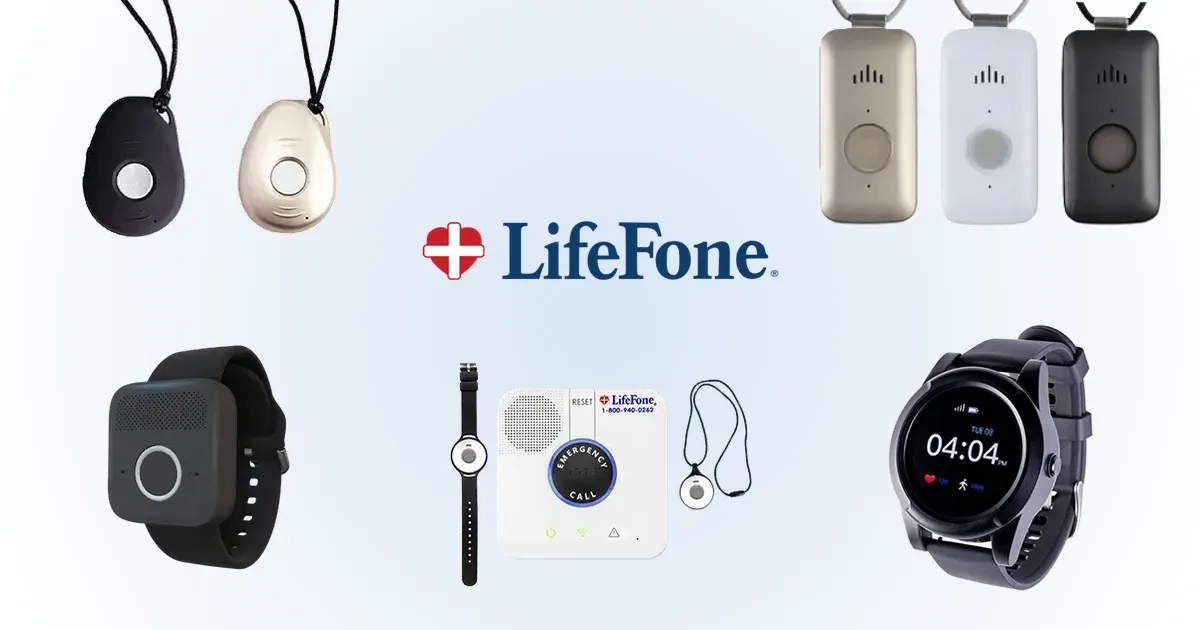
LifeFone is one of the most reliable and customer-friendly medical alert providers available in 2026. Its combination of zero equipment fees, lifetime price guarantees, and prorated refunds makes it an exceptionally safe financial choice for families evaluating medical alert services.
For household protection, the At-Home Cellular system provides dependable 1,300-foot coverage with free monitoring for a spouse. For active seniors, the VIPx mobile communicator stands out as an industry leader thanks to its featherweight 1.3-ounce profile and unprecedented 16-day battery life.
By keeping equipment costs included in the monthly subscription and charging just $5 for fall detection, LifeFone delivers top-tier emergency response without the hidden fees or restrictive contracts common across the industry.
VIEW LIFEFONE PLANS