
Medical Guardian Review 2026
Medical Guardian is a strong option for older adults who want professional emergency monitoring and a choice of devices they can wear comfortably. Its current lineup covers home use, a compact mobile button, and a touchscreen smartwatch. Guardian Flex is the most versatile choice for someone who leaves home regularly; the home systems are simpler, while MGMove suits people who already enjoy wearing a watch.
This is a research-based editorial review. We have not personally tested these devices; independent testing is identified by source below. We may earn compensation through provider links. We have not assigned a new numerical score or presented this article as expert-reviewed.
1. Medical Guardian at a Glance
Medical Guardian combines a device subscription with access to a monitoring team. A help-button press starts a call or signal; the operator evaluates the request and coordinates assistance. The service is particularly relevant when reaching or operating a phone would be difficult.
- Current choices: MGHome Landline, MGHome Cellular, Guardian Flex, and MGMove.
- Home coverage: A base station and wearable button for assistance around the house.
- Mobile coverage: Cellular devices with location support for use at home and away.
- Fall detection: An optional service on compatible equipment, rather than a guarantee that every fall will be recognized.
- Caregiver access: Account management and supported device information through MyGuardian.
- Billing: Monthly, quarterly, and annual plans, with a minimum service period under current terms.
The manufacturer's device comparison is the starting point for matching a system to a routine. If the wearer spends time outside, start with a mobile model. If the priority is a simple button at home, compare the two base-station options first.
2. Medical Guardian Pros and Cons
Pros
- Home, pendant, and smartwatch choices accommodate different preferences
- Mobile devices include a speaker for conversations with monitoring
- Flex has a longer advertised charging interval than the watch
- Shower-safe wearable options make consistent use more practical
- Caregiver tools help with device and account management
- Home cellular coverage does not require owning a smartphone
Cons
- Equipment and add-ons can make the overall package expensive
- Current service terms include a 90-day minimum commitment
- Mobile operation depends on reception and battery power
- Fall detection can miss falls or generate accidental alerts
- Home button range does not equal voice range from the base station
- Touchscreen controls and daily charging will not suit every user
The advantages matter most when they solve an actual problem: a mobile device for someone who walks outdoors, or a base station for someone who wants minimal controls. The drawbacks deserve equal weight. Before ordering, let the wearer compare the controls and wearing styles, and give a family member responsibility for checking billing and cancellation requirements.
3. Medical Guardian Devices Compared
The four systems serve different purposes. A home device remains tied to its base station; a mobile device brings its speaker and connection along. GPS availability is therefore a useful dividing line, but comfort and charging habits can matter just as much.
Scroll horizontally to see all columns.
| Model | Type / GPS | Power and range | Fall detection | Best fit |
|---|---|---|---|---|
| MGHome Landline | Home system / No GPS | Plug-in; up to 32-hour backup; up to 1,400-foot button range | Optional compatible pendant | An existing landline and mostly home use |
| MGHome Cellular | Home system / No GPS | Plug-in; up to 32-hour backup; up to 1,400-foot button range | Optional compatible pendant | Home use without a landline |
| Guardian Flex | Mobile wearable / GPS | Up to five days between charges; cellular coverage required | Optional; follow wearing instructions | A small device for home and away |
| MGMove | Smartwatch / GPS | Up to 24 hours between charges; cellular coverage required | Optional on current offerings | A watch wearer comfortable with a touchscreen |
Specifications are advertised maximums from the landline, home cellular, Flex, and MGMove pages. Walls, interference, activity, and signal strength can change actual performance.
A home wearable sends the alert but does not contain the speaker used for the conversation. Mobile coverage is also not literally unlimited: a device must have a usable network connection. When comparing providers, ask what happens if the operator cannot hear the wearer and how the registered address or mobile location is used.
4. Medical Guardian Pricing and Fees
The subscription is only one part of the purchase. Compare service, equipment, optional detection, shipping, and taxes together. The rates below reflect standard pricing reported by SeniorLiving.org's current review, with annual starting offers checked against product pages. A promotion may reduce the equipment charge, but it should not be assumed until confirmed in the order.
Scroll horizontally to see all columns.
| Model | Monthly plan | Annual plan upfront / equivalent | Equipment | Fall detection | Year one: monthly billing, with detection |
|---|---|---|---|---|---|
| MGHome Landline | $31.95 | $335.40 / $27.95 per month | $149.95 | +$10/month | $653.35 |
| MGHome Cellular | $38.95 | $419.40 / $34.95 per month | $149.95 | +$10/month | $737.35 |
| Guardian Flex | $44.95 | $479.40 / $39.95 per month | $149.95 | +$10/month | $809.35 |
| MGMove | $49.95 | $539.40 / $44.95 per month | $199.95 | +$10/month | $919.35 |
The first-year column is arithmetic: twelve monthly service payments, twelve $10 fall-detection payments, and the standard equipment fee. It excludes other extras. Without fall detection, subtract $120. These are comparison examples, not live checkout quotes or promises that every package is available on identical terms.
Monthly, Quarterly, or Annual Billing?
Monthly billing spreads payments, while annual billing requires a larger upfront payment for a lower equivalent rate. For Flex, the annual service amount plus detection and standard equipment comes to $749.35, compared with $809.35 using monthly billing. The difference is $60 before other charges. Quarterly billing offers another payment schedule; request its current total rather than estimating it from the annual offer.
Before paying annually, consider whether the device is a good fit and whether you can comfortably pay the full amount. Savings become less useful if the wearer changes devices or stops using the system. Check refund rules alongside the discount, and keep a copy of the order showing the selected billing cycle.
What Should Be in the Quote?
Ask for a written breakdown of equipment ownership, service, accessories, recurring extras, delivery, and renewal. A free-device promotion and a lower annual equivalent are different discounts. Check which one applies, whether it has conditions, and what happens at renewal. If a caregiver places the order, share the final cost with the person paying so that optional services do not become a surprise later.
5. Medical Guardian Device Reviews
MGHome Landline: Best for Simple Home Protection
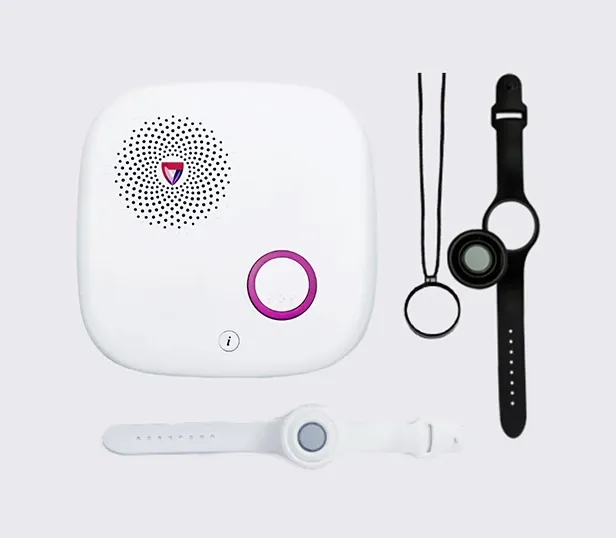
Best for: Someone who spends most of the day at home, has a suitable landline connection, and wants a help button without mobile charging or watch menus.
Key specifications: Landline connection, no GPS, a powered base station with backup battery, and a compatible pendant or wrist button. The base handles voice communication. Automatic detection uses the appropriate optional pendant rather than turning every standard wrist button into a fall detector.
Its greatest strength is simplicity. Put the base where the wearer can hear it, keep the button on, and test the areas used regularly. An existing telephone line can make this option attractive where cellular reception is inconsistent. However, do not assume every internet-based phone service behaves like a traditional line; ask the company about the actual connection at the address.
The lower service price is another advantage, although a landline bill remains a separate household expense. The practical limitation is leaving home: a button connected to this base does not provide mobile protection on errands. It is also worth testing the yard separately from indoor rooms.
Our assessment is that Landline makes sense for a stable home routine. If the person frequently visits friends or walks beyond the house, paying for mobile protection may be more useful than adding accessories to a home package. See the MGHome Landline details.
MGHome Cellular: Best for Home Use Without a Landline

Best for: A home-focused user who wants a base-station system but no longer has a landline.
Key specifications: Cellular connection, no GPS, backup power, and wearable help buttons. The included cellular service is part of the alert package; owning a personal smartphone is not required. An optional detection pendant communicates through the home base.
This system has much of Landline's familiar operation without depending on a phone jack. For some families, that removes an unnecessary telephone service. However, it substitutes a different dependency: reception at the base station's location. Test before treating the system as ready, and ask support for help if connection quality changes.
The button may work well beyond the room containing the base, but voice still comes from the base's speaker. Discuss the response procedure for situations where the wearer can press a button but cannot speak loudly enough to be heard. Do not move the equipment to another address without updating the account and retesting.
We would choose Cellular over Landline when the house has reliable reception and a landline would otherwise need to be maintained solely for monitoring. Its weakness is that it remains a home system despite the word cellular. It is not a substitute for a mobile wearable. See MGHome Cellular specifications.
Guardian Flex: Best for a Compact Mobile Help Button
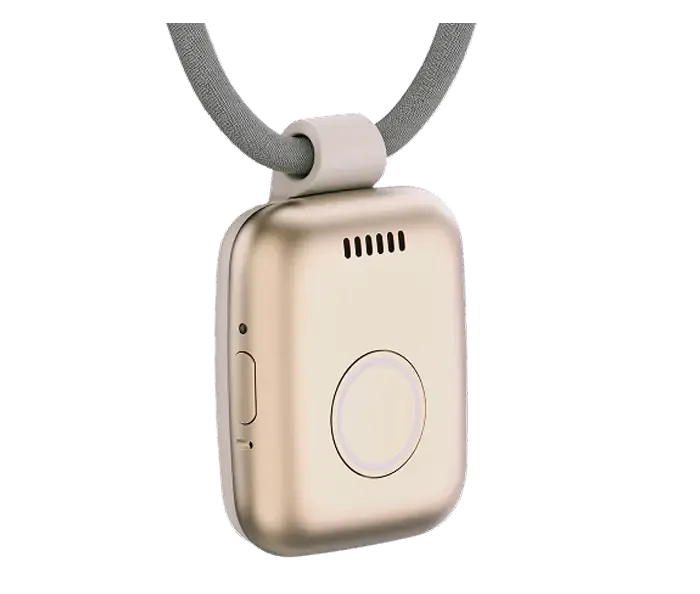
Best for: Someone who wants assistance at home and outside without managing a watch interface.
Key specifications: Its own cellular connection, GPS location support, built-in two-way talk, several wearing options, and optional fall detection. A speaker on the wearable means the conversation can happen where the person is, rather than at a distant base station.
Flex's design makes it a sensible starting point for active users. The lack of a touchscreen reduces menu navigation, while the wearing choices give the person a say in what feels comfortable. Try the chosen attachment and ask whether any accessory costs extra. If detection is enabled, confirm the approved position instead of assuming every attachment works equally well for it.
The advertised battery interval is convenient, but establish a routine before it becomes low. Someone who takes the device off for charging needs another way to request help during that time. A charger placed where it is easy to see is often more useful than a longer theoretical battery maximum.
Flex is our most versatile choice within this lineup, rather than an automatic recommendation for every buyer. Its limitations are cellular dependence, equipment cost, and fewer screen-based functions than a watch. A person who rarely leaves the house may get adequate protection from a cheaper home plan. See Guardian Flex options.
MGMove: Best for Someone Who Prefers a Watch
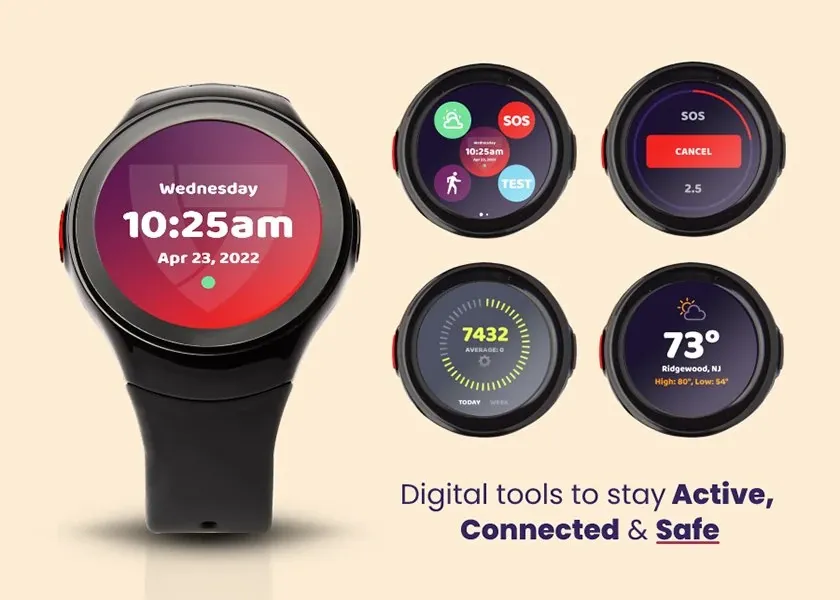
Best for: A watch wearer who wants mobile emergency calling and is comfortable interacting with a touchscreen.
Key specifications: Cellular calling, location support, two-way audio, activity and weather tools, and optional detection on current offerings. Optional Social Circle services add messaging and reminders. A compatible personal phone is not needed for the watch to place its monitoring call.
The advantage is familiarity: a watch can feel like part of getting dressed rather than an extra pendant. The screen also provides information a simple button does not. Let the intended user try the controls, including finding the emergency function and reading the display. Comfortable fit and understandable controls matter more than the number of apps.
Daily charging is the key compromise. Decide when the watch will be charged and what the wearer will use during that interval, particularly if overnight protection is important. Consider whether a caregiver can help with reminders without taking over every interaction.
We would shortlist MGMove for users who like a watch and will use its additional functions. We would favor Flex when a single obvious button and less frequent charging are more suitable. Earlier MGMove reviews can describe different pricing or detection availability, so match the review to the current device being offered. See MGMove plans and features.
6. How Does Medical Guardian Work?
The basic process has three stages:
- Send the alert. The wearer presses the help button, or compatible activated detection sends a signal after a recognized fall.
- Connect with monitoring. An operator attempts to speak with the user. The available account information and mobile location support help establish where assistance is needed.
- Arrange assistance. Monitoring contacts appropriate responders or designated contacts according to the situation and response procedure.
A help-button press is not the same as placing a direct call to a relative. The monitoring team handles the request, and families should understand when contacts are notified. Likewise, reaching an operator does not mean emergency personnel have arrived.
Ask about the procedure if the user cannot speak, is away from the registered address, or accidentally activates the device. Practicing a system test makes the process less unfamiliar. Keep emergency contacts current, and make sure they know what a monitoring call may look like. If the device is unavailable or cannot connect, another available method of calling for emergency assistance remains important.
7. Performance and Reliability
What Independent Tests Show
Published tests are useful evidence, but the reviewers did not all use the same hardware, locations, or methods. The table identifies the source and the device rather than turning several experiences into one provider-wide promise.
Scroll horizontally to see all columns.
| Source | Device or evaluation | Reported result | What it tells you |
|---|---|---|---|
| NCOA | Home systems / Flex / MGMove | Average monitoring connections: 36 / 15 / 20 seconds | Results differed by device in that evaluation |
| SafeHome | Medical Guardian evaluation | 23-second average connection | A separate evaluation, not a guaranteed service level |
| SeniorLiving | Guardian Flex simulated falls | Eight of ten recognized | Detection missed some staged falls |
| Forbes Health | Earlier MGHome Cellular and MGMini hardware | Variable connections and inconsistent fall detection | Relevant historical testing, not a current Flex accuracy score |
See the original NCOA, SafeHome, SeniorLiving, and Forbes reports for context. Where a result does not specify an identical sample size and protocol, it should not be ranked as though it came from a shared benchmark.
Reception, Location, and Audio
For a mobile device, coverage must be checked where the person actually goes. A strong signal at home does not establish reliability at a favorite shop or walking route. Location support can help monitoring, but we have not measured current Flex GPS accuracy and do not claim a particular distance of error.
Audio matters too. During a permitted test, listen for whether the wearer understands the operator and whether the operator can hear them in the usual environment. Outdoor noise or a device covered by clothing can make a conversation less clear. Describe any persistent issue to support rather than assuming it is normal.
Fall Detection and Battery Habits
Detection adds another route to request help; it does not guarantee that a fall will be noticed. The quoted simulated-fall results are small tests, not predictions for every real incident. Follow the model's wearing instructions and press the button whenever possible. If an accidental call connects, explain it to the operator.
Battery specifications should guide routines rather than become deadlines. A charged device that is worn consistently is more useful than one with impressive specifications left in a drawer. Our assessment is that reliability combines equipment, coverage, clear account information, and habits that the user can maintain. Test results inform that choice, but cannot replace checking the actual setup.
8. Features and Add-ons
Optional services should solve a specific need. Before accepting a package, separate the functions included in the system from services charged each month. The reference charges below appear in published reviews and manufacturer support materials; confirm availability and the exact charge for the current model.
Scroll horizontally to see all columns.
| Option | Reference charge | Purpose | Check first |
|---|---|---|---|
| Fall detection | $10/month | Automatic alert after a recognized fall | Compatible device and approved wearing position |
| On-Guard notifications | $2.99/month | Emergency text and email notifications | Recipients and supported plan |
| MGMove Social Circle | $5/month | Messaging and reminders | Watch version and included functions |
| Lockbox | $2.99/month; some annual offers include it | Key access for responders | Offer terms and a suitable installation location |
| Protection plan | $6.99/month in support listings | Additional equipment protection | Current model price, exclusions, and replacement limits |
The manufacturer's support add-on listings describe several of these charges on supported equipment; legacy support pages are not a current-model quote. SafeHome discusses MGMove's paid apps. Ask for model-specific confirmation before treating any option as available.
A lockbox addresses access to the property, while detection addresses initiating an alert; they do different jobs. Extra wall buttons can help in fixed locations, but are less useful when a person is elsewhere. Start with the user's routine and add only features with a clear purpose. Review the bill periodically when needs change, and ask how removing an add-on affects an existing promotion.
9. Setup and Ease of Use
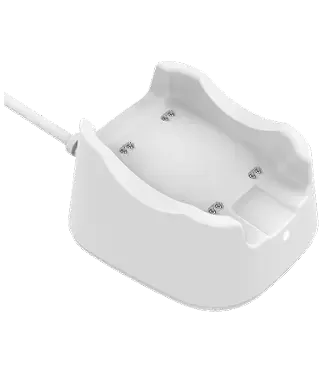
Plan setup when a family member or helper can spend time with the wearer. Confirm what is included before discarding packaging, especially because return conditions may require it. Read the instructions supplied with the actual device; button timings and indicators can differ across versions.
For home equipment, choose a powered location with a clear path for hearing the speaker and, for Cellular, a usable signal. For portable equipment, charge it as instructed and check that the user can place it correctly in the cradle. A charger that is difficult to use deserves attention before the device becomes part of the routine.
Finish by testing the system and practicing how to explain an accidental activation. Make sure the wearer can reach the button with either hand if that matters to their mobility. Keep the instructions and support number accessible. The MGMove support guide provides model-specific setup information; avoid copying its steps to a different device. Straightforward setup is valuable, but familiarity comes from practicing the controls, not simply receiving the package.
10. MyGuardian App and Caregiver Features
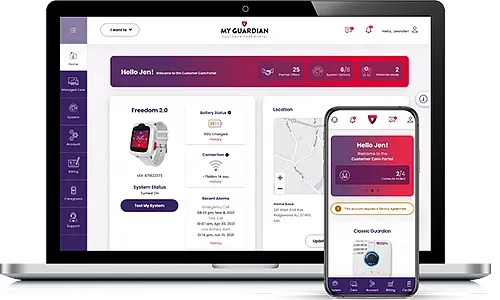
MyGuardian is useful for organizing the information that supports monitoring and checking supported device details. A family can keep emergency contacts updated, review account information, and use available mobile status or location information. The exact functions depend on the system and selected services.
Before relying on a location display, look at its update time. A point shown on a map should not automatically be interpreted as continuous live tracking. Similarly, a battery indicator is useful only when someone checks it and follows up. Decide who will manage charging concerns and who will keep the account details current.
Separate account access from paid notifications or messaging. A person may be able to view information without having every optional alert enabled. Give caregivers appropriate access with the wearer's agreement rather than sharing credentials casually. The app supports coordination; emergency requests still go through the help system and monitoring process.
For families at a distance, these tools can reduce guesswork. Their value depends on a manageable routine, however, and purchasing every notification is unnecessary if nobody intends to use it. Ask the company to demonstrate the functions included with the selected package.
11. Customer Service, Warranty, and Cancellation
Support and Equipment Protection
Emergency monitoring and customer service are different functions. Monitoring handles alerts; support handles setup, billing, device questions, and account changes. The customer service page lists 1-800-313-1191 and describes its support channels. Confirm availability for the task you need, especially when it concerns cancellation rather than technical help.
Warranty language also requires care. The public warranty page includes legacy-device terms and a separate paid protection plan. Do not assume a Freedom Guardian warranty statement describes a newly purchased Flex. Ask which defect coverage applies to the exact order, whether accidental damage or loss is excluded, and how replacement works. A paid plan and a manufacturer's defect warranty are different benefits.
Equipment Returns Are Different from Service Refunds
The terms effective October 5, 2026 state a 90-day minimum service commitment. They separately describe a 15-day return window from receipt for eligible new purchases, requiring original undamaged condition, accessories, and packaging; shipping and handling can be excluded. Promotional and refurbished-device exceptions can apply. Returning a device does not automatically remove the minimum service obligation.
Memberships renew automatically. Cancellation requires a request and confirmation; leased-device billing can continue until return and processing. Eligible prepaid service beyond the minimum can be prorated, less applicable fees. Ask for written instructions covering ownership, deadlines, and the amount refundable for your order.
Keep the confirmation, shipping receipt, and tracking details. If a statement is unclear, resolve it before paying rather than assuming a generic return promise covers both equipment and monitoring.
12. Medical Guardian vs. Competitors
A useful comparison starts with an equivalent package. Compare a home system with another home system, and a mobile wearable with another mobile wearable. Price differences are less meaningful when one quote includes detection or equipment and the other does not.
Scroll horizontally to see all columns.
| Provider | Why compare it? | What to compare in the quote |
|---|---|---|
| Medical Guardian | Choice of home, Flex, and watch styles | Device fit, equipment, detection, and minimum commitment |
| Bay Alarm Medical | Another home, mobile, and watch lineup | Watch battery, equipment, return window, and selected extras |
| MobileHelp | Home and mobile alternatives | Current device package and written cancellation terms |
| LifeFone | Alternative mobile and caregiver packages | Location tools, detection, and upfront annual billing |
These are comparison directions, not a claim that one brand is always cheaper or faster. Read the linked reviews, request equivalent written totals, and test coverage for the chosen device. A provider with a lower base rate can cost more after accessories, while a feature-rich package can be poor value if the wearer dislikes it.
We would prioritize comfort, clear controls, and reliable reception before small price differences. For families mainly concerned with cancellation flexibility, start with the written terms. For a watch user, compare charging and readability as closely as the subscription. Product names alone do not establish that two offerings provide the same experience.
13. Who Should Buy Medical Guardian?
Best for: Someone who wants professional monitoring, values a choice of wearing styles, and can maintain the device. Home systems suit a mostly home-based routine; Flex suits a person who wants a compact button outside; MGMove suits a comfortable watch user. Caregiver tools are useful when a family agrees who will check information and handle account changes.
Not ideal for: A buyer focused solely on the lowest total cost, a person who expects service without a minimum commitment, or someone whose usual mobile locations lack usable reception. A touchscreen is also a poor match if it makes requesting help harder.
Choose with the wearer rather than simply for them. Ask which attachment feels acceptable during everyday activities, who will handle charging, and whether the price fits the household budget. A simpler system used consistently is often the better choice than a more elaborate system that feels inconvenient.
14. Final Verdict: Is Medical Guardian Worth It?
Medical Guardian is worth considering for its choice of practical devices, professional monitoring, and caregiver tools. Guardian Flex suits someone who wants a compact mobile help button, MGMove offers a familiar watch format, and the home systems keep operation simple. The strongest value comes from choosing a device the wearer understands, finds comfortable, and will use consistently.
The main drawback is the complete cost. Include equipment, fall detection, and useful add-ons when comparing plans. Current terms require a 90-day minimum service commitment, so monthly billing should not be treated as a risk-free trial. Check reception and establish a charging routine before relying on a mobile device.
Medical Guardian belongs on the shortlist for families who value device choice and will use its features. If the lowest price or greater return flexibility matters most, compare the alternatives before committing. Independent tests offer useful context, but the final decision should reflect the user's routine, coverage, and budget.
VIEW MEDICAL GUARDIAN PLANS