
MobileHelp Review 2026
MobileHelp is worth considering if the priority is a straightforward medical alert button rather than a smartwatch or a large set of screen-based features. Its current range offers two home systems and the Elite portable device. The most useful distinction is where the wearer needs help: around the house, or during walks, errands, and visits as well.
We would start with Classic Cellular for home use without a landline, Classic Landline where a suitable phone connection is available, and Elite for someone who regularly goes out. A lower starting rate matters only if the chosen equipment fits the wearer's routine and the complete subscription remains affordable.
This is a research-based editorial review, using manufacturer information and separately attributed independent testing. We have not personally tested these devices or assigned a new numerical rating. We may receive compensation through provider links. Our recommendations focus on practical fit, costs, and the conditions that affect everyday use.
1. MobileHelp at a Glance
MobileHelp combines wearable help buttons with a monitoring subscription. The home systems keep the main communicator in one place; Elite brings the communicator along. That distinction affects voice communication, coverage, and how the household handles charging.
- Home choices: Classic Cellular and Classic Landline.
- Portable choice: Elite, with its own speaker and location support.
- Operation: A help-button press starts the response process.
- Optional services: Compatible fall detection and other plan-dependent extras.
- Family involvement: Caregiver and account tools on supported packages.
- Buying decision: Match the device to the wearer, then check the full written quote.
The current product range is simpler than older MobileHelp catalogs. Reviews of Solo, Micro, or DUO equipment can still offer historical context, but their specifications and test results should not be transferred to Elite without checking the model. We focus on the products currently offered for sale.
2. MobileHelp Pros and Cons
Pros
- Home and portable formats serve different everyday routines
- Classic Cellular avoids the need for a home telephone line
- Elite combines a help button, speaker, and location support
- A familiar button can be easier to use than a touchscreen
- Home buttons offer necklace and wrist-worn choices
- Published starting rates make initial comparisons easier
Cons
- Cellular operation depends on usable reception
- A portable device needs a reliable charging routine
- Standard home buttons do not contain a speaker
- Extras can change the advertised starting cost
- Written minimum-service terms need careful attention
- Published claims and older reviews do not establish current Elite test results
The clearest advantage is simplicity. Someone who wants one accessible control may gain little from a watch screen they find difficult to use. The tradeoff is that the family still needs to manage the practical details: charging, contacts, reception, and the subscription. A simple button does not remove those responsibilities.
3. MobileHelp Devices Compared
Choose the connection and format before comparing extras. A home button can reach its base from another room, but that does not turn it into a portable communicator. With Elite, the speaker travels with the wearer instead.
Scroll horizontally to see all columns.
| Model | Connection / location | Power and range | Fall detection | Best fit |
|---|---|---|---|---|
| Classic Cellular | Home base using AT&T cellular service; not a portable GPS system | Plug-in; approximately 30-hour backup; up to 1,400-foot button range | Optional compatible service | Home use without a landline |
| Classic Landline | Home base connected to a telephone line; no mobile location function | Plug-in; approximately 30-hour base backup; up to 600-foot button range | Confirm exact equipment compatibility | Mostly home use with a suitable landline |
| Elite | Portable AT&T 4G LTE device; GPS and Wi-Fi-assisted location | Rechargeable; up to six days in standard mode | Optional; follow the supplied wearing instructions | Home and away with one main communicator |
The Cellular, Landline, and Elite pages describe these different configurations. The range figures are advertised maxima, not measurements inside a particular home. Walls, placement, and the supplied equipment matter; include the bathroom, bedroom, and other regularly used spaces in setup testing.
4. MobileHelp Pricing and Fees
For comparison, the table uses the manufacturer's displayed starting monthly rates, not an annual-plan equivalent or a telephone promotion. The twelve-month figures are monitoring subtotals calculated from those monthly rates. They do not establish the complete first-year bill or promise the rate will stay unchanged.
Scroll horizontally to see all columns.
| System | Starting monthly monitoring | 12 x monthly rate | Fall detection | Costs to confirm separately |
|---|---|---|---|---|
| Classic Cellular | $29.95 | $359.40 | Published home add-on: $10/month; confirm selected package | Equipment arrangement, accessories, taxes, and shipping |
| Classic Landline | $29.95 | $359.40 | Get written compatibility and pricing confirmation | Telephone service, equipment arrangement, and accessories |
| Elite | $37.95 | $455.40 | Optional; request the current ongoing rate | Device offer, attachments, extras, taxes, and shipping |
These starting rates appear on the home, landline, and mobile product pages. Older reviews sometimes list a different Elite price. Use a current written order rather than assuming every published quote describes the same offer.
How Much Do Extras Change the Bill?
A $10 monthly add-on adds $120 across twelve months. At that rate, Classic Cellular monitoring plus detection would total $479.40 before other charges. This is arithmetic for a stated configuration, not a quote for every device or promotion. Repeat the calculation with the actual order's monitoring and accessory fees.
Elite is currently promoted with a separate phone-only offer that includes detection. We do not use a temporary offer as the standard rate in the table. Ask how long a discount lasts and what will be charged afterward. Also establish whether equipment is leased or purchased; a device advertised without an upfront payment can still carry return obligations.
Monthly Billing or a Prepaid Plan?
Compare the total amount due, not just the smallest monthly-looking number. For a prepaid plan, ask what is refundable if needs change. For monthly billing, ask about the minimum service period. Keep the order confirmation with the selected equipment, recurring charges, and any promotional conditions so the family has one clear record.
5. MobileHelp Device Reviews
Classic Cellular: Best for Home Use Without a Landline
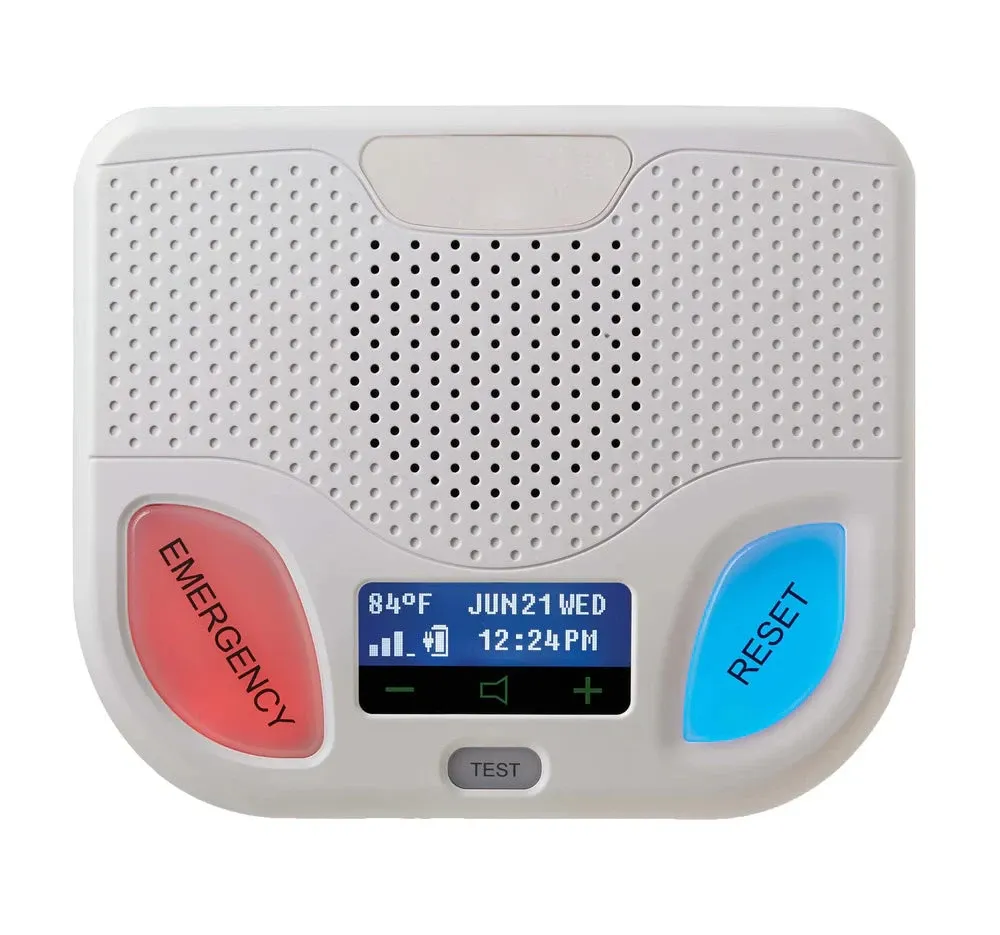
Classic Cellular suits someone who mainly wants help around the house and prefers a small wearable button. The base handles the connection and voice conversation. It can be a better fit than carrying a larger mobile device from room to room, provided reception and the tested button range suit the property.
The wearable is a trigger, not a miniature speakerphone. A user in a distant room may be able to send an alert while being too far away for a comfortable conversation through the base. Ask the wearer to try an ordinary speaking voice from the places that matter. Describe any hearing or speech difficulties during setup rather than assuming a loud base solves every situation.
Best for: A mostly home-based routine where a cellular base can be positioned effectively. Main drawback: In-home coverage and the base speaker remain the limits; the system does not accompany the user on errands. Confirm which button and optional detection accessory the order includes.
Classic Landline: Best for a Suitable Existing Phone Connection
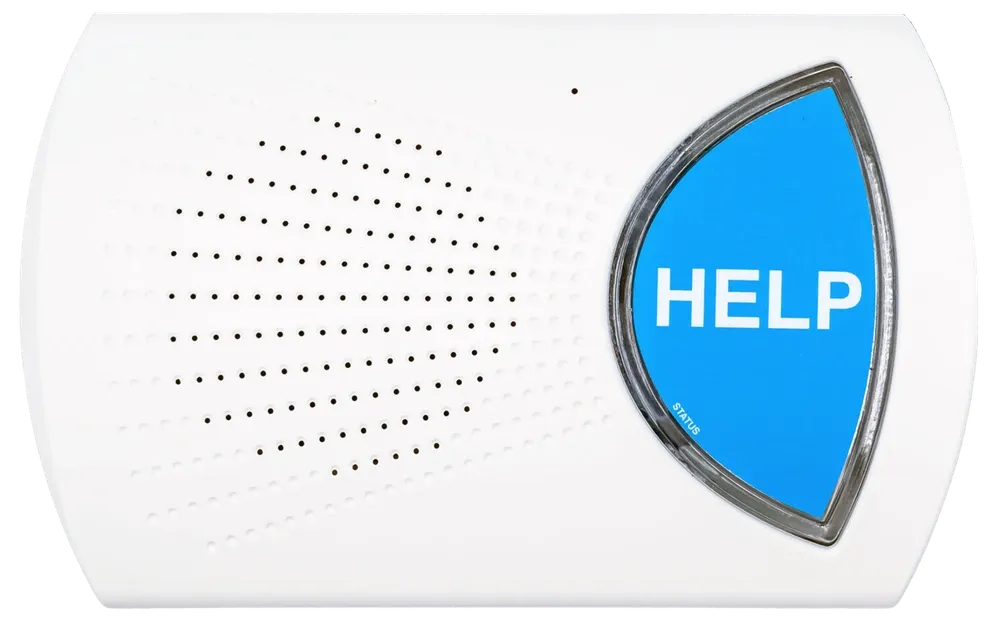
Classic Landline offers a home communicator for someone who already has a suitable telephone connection. It deserves consideration where indoor cellular reception is poor, but the household should first establish that its actual phone service works with the supplied base. A wall jack alone does not explain what happens during a power or internet outage.
Its shorter advertised button range makes practical testing especially important. Include the usual sleeping area and any outdoor space where the person expects to rely on the button. The relevant question is whether the system works in those places, not whether a distance on a product page sounds large.
Fall-detection information needs clarification before purchase: the current landline page contains generic detection language, while some independent reviews say their Wired Home configuration is incompatible. We would require written confirmation of the exact model, accessory, and service rather than treating either description as a universal rule.
Best for: Home use with a verified compatible landline. Main drawback: It is tied to the telephone setup and base coverage rather than providing portable protection.
Elite: Best for One Communicator at Home and Away
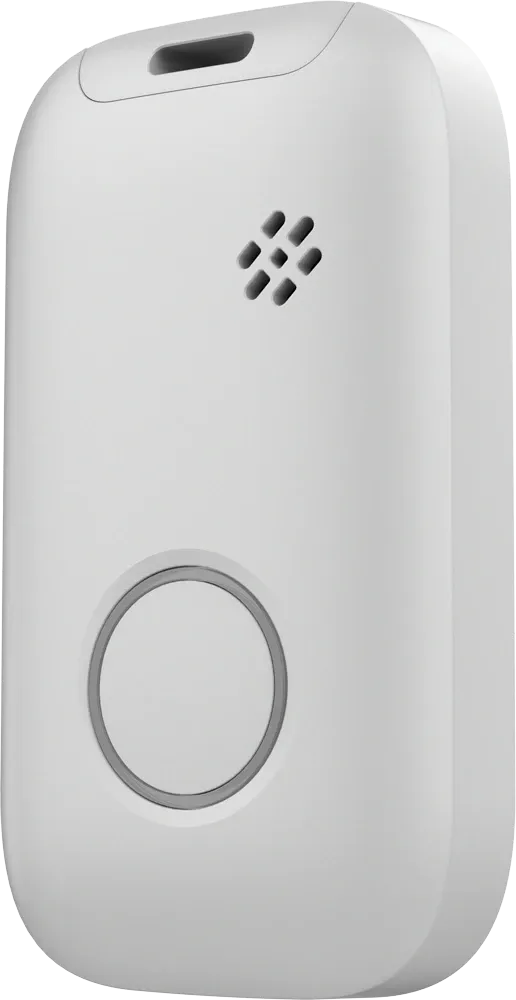
Elite is the option we would investigate first for someone who walks outdoors, visits friends, or regularly runs errands. Unlike a standard home button, it contains the speaker and microphone needed for a monitoring conversation. The wearer does not have to remain near a separate home base to speak through it.
The manufacturer's June 2026 launch announcement identifies it as the new mobile model, with a 1.5-ounce design and several colors. Treat claims about previous portable systems as a different equipment generation. Let the wearer handle the device and attachment before deciding that its dimensions will be comfortable all day.
Best for: A person who wants a dedicated help device across home and away routines. Main drawback: Reception and charging accompany it everywhere. Check how the chosen attachment, optional detection, and any paired button work together rather than assuming every advertised wearing style supports every feature.
6. How Does MobileHelp Work?
The basic process is a request for help followed by assessment and coordination. The system is not itself an ambulance service. A family should understand the call flow before an urgent situation, especially if the wearer expects every test to begin with a live conversation.
- Start the request. Use the help control as described in the supplied guide, or an enabled compatible detection service may initiate an alert.
- Answer the initial prompt. The current FAQ describes an automated assistant that routes a request for help, silence, or an unclear response to an operator; a routine test may end with the assistant.
- Communicate through the main unit. Explain the situation if able, using the home base or portable communicator.
- Let monitoring coordinate the response. Current account information helps the team identify appropriate contacts and assistance.
Practice a test using the current instructions. Explain that a different voice or an unfamiliar prompt is not necessarily a failure. Keep contacts and access information current, and discuss the procedure with anyone who may help the wearer during setup or account changes.
7. Performance and Reliability
Published Tests Need Model Context
We found independent connection measurements, but they do not establish a current Elite performance guarantee. The reviewers used different equipment and did not publish a shared protocol. A short advertised connection claim belongs in a different category from a measured average.
Scroll horizontally to see all columns.
| Source | Equipment or scope | Published observation | Practical limit |
|---|---|---|---|
| The Senior List | Classic home-system evaluation | 26-second average across 10 test calls | Home-system results; not an Elite benchmark |
| SeniorLiving | Reviewer experience across MobileHelp systems | Approximately 17-second average connection | Different evaluation; not a model-specific service promise |
| MobileHelp | Current marketing claim | Connection in as little as 10 seconds | Manufacturer claim, not independently measured here |
See The Senior List's test description and SeniorLiving's review for their methods and equipment context. The Senior List describes a fall-button demonstration, but that is not a current Elite detection-accuracy study. We do not turn it into a percentage or use it to rank the new model's detection against competitors.
Connection time also differs from emergency-response arrival. Local availability and the situation affect what happens after monitoring receives a request. A quick test call can help establish that the equipment is working; it cannot promise a particular emergency outcome.
Reception, Location, and Audio
Check Elite and home cellular reception at the intended locations. A carrier's nationwide service description does not establish indoor coverage in a specific room. For mobile use, include ordinary routes and destinations in the assessment, and contact support when an indication or voice message is unclear.
Location information is a support tool rather than a substitute for describing where the wearer is, if able. A displayed position may have a timestamp or accuracy limit. The audible Find Me locator serves a different purpose: it helps find the physical device nearby rather than proving where a person is at every moment.
Detection and Wearing Habits
Optional detection is useful only when the correct equipment and service are active and the device is worn as instructed. Keep the button accessible and press it when possible. A device dropped onto the floor does not reproduce every human fall, so avoid making up a home accuracy score from that kind of demonstration.
8. Features and Add-ons
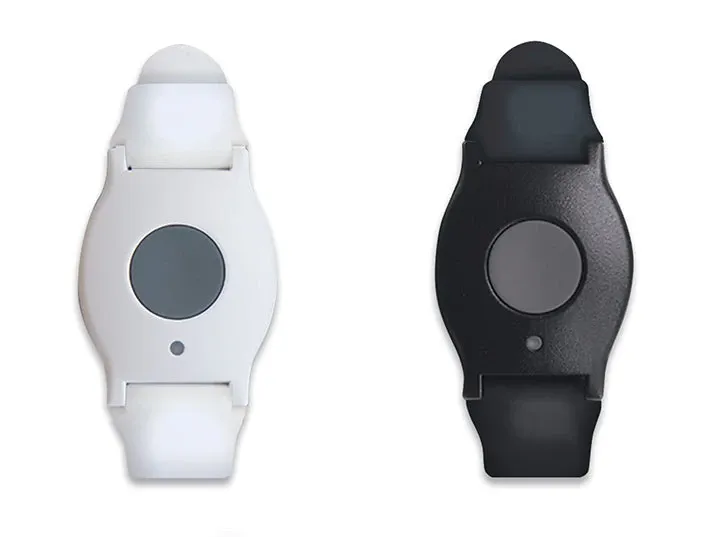
An accessory should solve a specific problem, such as making a help control easier to reach or giving responders an agreed entry method. Ask which functions work with the supplied main unit and whether a charge is one-time or recurring. Buying another button does not automatically add another mobile communicator.
Scroll horizontally to see all columns.
| Feature | Purpose | Price basis | Question to ask |
|---|---|---|---|
| Automatic fall detection | Can initiate an alert without a manual press | Home page lists $10/month; other offers vary | Which compatible accessory and wearing position are required? |
| Additional or paired help button | A reachable control in another wearing style | Request the accessory and service quote | Can it trigger the main unit during charging, and within what range? |
| Belt attachment | An alternative way to carry Elite | Optional add-on in the current box description | Does the chosen wearing position support enabled detection? |
| Lockbox | Provides an agreed way to access a key | Package or accessory dependent | Who holds the code, and is entry information current? |
| Caregiver or equipment-protection upgrade | Additional account tools or specified replacement benefits | Request the current plan price and exclusions | What does it add beyond standard service and device coverage? |
The home product page describes detection and lockbox offers. Confirm the actual contents before relying on a promotional illustration. A wrist button, detection pendant, and main device can look related while serving different functions; ask support to identify each item in the order.
9. Setup and Ease of Use
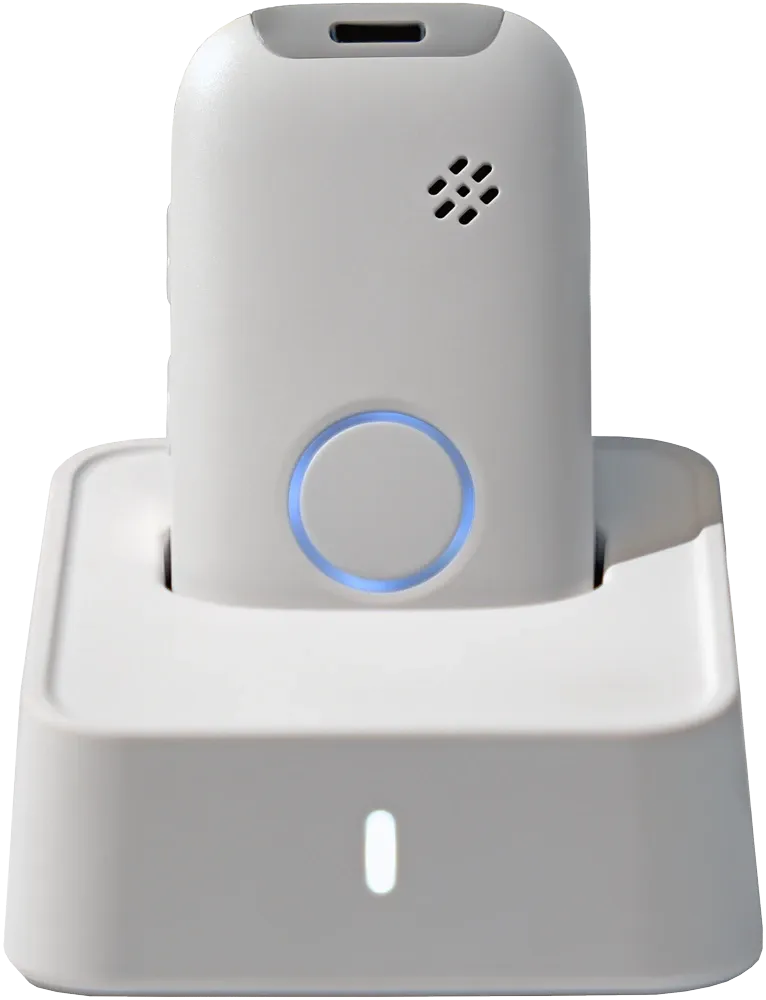
Set aside time for setup soon after delivery. Unpack against the order confirmation, save the packaging, and use the guide for the supplied model. A video or review showing an earlier base station may have different controls and test procedures.
For a home system, choose a practical base location with power and suitable connectivity. Check whether the speaker can be heard from the usual living spaces. For a landline system, include the telephone connection in that check. Then test every supplied button rather than assuming one successful base-station call proves that each accessory is paired.
For Elite, let the wearer try placing the device in its cradle and recognizing the charging indication. The manufacturer's setup guidance recommends an initial charge and regular tests. Agree on a charging time and a way to request help when the main device is not being worn. If a paired button is part of that arrangement, verify its connection and operation with support.
Consider the small physical tasks too: fastening a wristband, finding the help control by touch, and removing a device from its dock. An attachment that looks comfortable in a photograph may still be difficult for the intended wearer. A family member should know how to help without changing settings the wearer relies on.
10. MobileHelp Connect and Caregiver Features
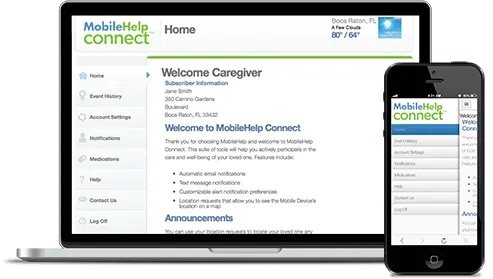
MobileHelp's Connect overview describes account alerts and location tools for compatible systems, with standard and paid options. The published page lists an allowance of 30 location requests a month and additional request packages. Confirm what applies to the current Elite order instead of interpreting a general tracking description as unlimited on-demand caregiver checks.
The current FAQ also describes family-contact and coordination tools. Ask for a demonstration of the features the household intends to use, including who can access information and what requires an upgrade. The illustration above shows a manufacturer portal example; it is not evidence that every current account has an identical interface or the same functions.
Choose a simple family arrangement: who updates contacts, who checks device information, and who follows up on alerts. Obtain the wearer's agreement about access. Helpful technology can still create confusion if several relatives assume someone else is responsible for checking a notification or keeping the account accurate.
11. Customer Service, Warranty, and Cancellation
Monitoring and Account Support
Monitoring handles requests for assistance; administrative support handles billing, setup, and account changes. Round-the-clock monitoring does not mean every department operates at all hours. Use the current support information on the provider's site and establish who is authorized to discuss the account.
Equipment Coverage
The current terms describe a one-year warranty for new device purchases, with exclusions. A leased arrangement and an optional protection upgrade are separate questions. Confirm coverage for the actual equipment and the costs of loss or damage instead of assuming a free replacement benefit.
Cancellation and Returns
The terms effective October 5, 2026 specify a three-month minimum from payment or first service, whichever occurs earlier. This differs from the site's more flexible cancellation wording. Leased-device cancellation requires return and processing; the terms allow processing time, a non-return charge, and a possible restocking deduction.
A conditional 15-day return window concerns new purchased equipment, not a universal free monitoring trial. Eligible prepaid-service refunds are described separately. Before ordering, obtain the applicable terms; when canceling, request written confirmation and retain return tracking. The important record is the confirmed closure of the account, rather than simply stopping use of the device.
12. MobileHelp vs. Competitors
Compare equivalent configurations. A home base and a portable watch serve different routines even if their advertised monthly rates appear close. Begin with the connection and wearing style, then compare the complete quote for the features the household actually wants.
Scroll horizontally to see all columns.
| Provider | Reason to compare | Decision to check |
|---|---|---|
| MobileHelp | Simple home systems and the Elite mobile button | Coverage, complete quote, and written commitment |
| Medical Guardian | Guardian Flex and MGMove alternatives | Attachment preference, watch controls, and charging routine |
| Bay Alarm Medical | Home, compact mobile, and watch formats | Purchased equipment, package contents, and return process |
| LifeFone | Other home and mobile configurations | Relevant family tools and the selected payment terms |
MobileHelp and Medical Guardian are related brands: MobileHelp's Elite launch announcement identifies Medical Guardian's acquisition in 2024. That does not make their devices or subscription packages interchangeable. Compare the particular order and service terms rather than assuming the same name behind the brands means the same offer.
Ask each provider for the same desired configuration and note what is included. A cheaper home system is not better value for someone who needs help away from home. Equally, paying for a watch or extra location functions adds little if the wearer wants a straightforward home button and will not use the added features.
13. Who Should Buy MobileHelp?

Best for: Someone who wants a dedicated, understandable help button and is willing to choose the format around their routine. The Classic systems suit household use. Elite deserves a closer look for regular outings, particularly where the wearer prefers a button to screen-based controls.
Not ideal for: Someone who cannot maintain the selected equipment's charging or connectivity, or a buyer relying on a headline price without checking the full agreement. A home system is a poor fit if the main concern is assistance away from the base. A portable device is not a solution to persistent reception problems at the places it will be used.
Include the wearer in the decision and let them try the everyday tasks. Consider sleeping arrangements, shower routines, and how the device will be kept accessible during charging. Assign practical family responsibilities before the service starts rather than expecting everyone to work them out after an alert.
14. Final Verdict: Is MobileHelp Worth It?
MobileHelp is worth shortlisting for people who value a clear help-button format and want to compare straightforward home and portable choices. Classic Cellular is the natural starting point for home use without a landline, Classic Landline suits an appropriate telephone setup, and Elite brings the main communicator along when the wearer goes out.
The deciding factors are the actual locations, comfort, charging routine, and full written cost. Confirm the equipment supplied, optional features, and cancellation obligations. Published tests help frame the questions to ask, but do not guarantee a particular person's connection speed or fall-detection result.
Our recommendation is to choose MobileHelp when the equipment fits the wearer and the complete order makes sense for the household. Compare equivalent alternatives, test the supplied system promptly, and keep the button accessible. Consistent everyday use matters more than choosing the longest feature list.
VIEW MOBILEHELP PLANS